Struggling with document chaos? You’re not alone. Most businesses waste 20+ hours weekly on manual proposals, contract revisions, and signature chasing time that kills deals and frustrates teams. 😩
Enter PandaDoc, the all-in-one document automation platform that turns this mess into 2-minute workflows. Whether you’re crafting sales proposals, HR offer letters, or payment invoices, PandaDoc streamlines everything with templates, eSignatures, and smart tracking.
Why “use cases” matter: Every business is unique, but document pain points aren’t. Sales teams need fast quotes. HR wants secure onboarding. Finance craves quick payments.
This guide breaks down 8 battle-tested PandaDoc use cases with real workflows, showing exactly how modern businesses save time, close deals 30% faster, and eliminate paper chaos. 🌟
What you’ll discover:
- Sales proposals that clients actually read (and sign)
- Contracts without endless email ping-pong
- HR onboarding that impresses new hires
- Invoicing that gets you paid in days, not weeks
Perfect for: Sales managers, HR leads, agency owners, and anyone tired of document hell.
Already know the basics? Check our complete PandaDoc guide for features deep-dive.
Ready to see PandaDoc in action across your business? Let’s dive into real-world use cases that deliver ROI from day one. 🚀
1. Sales Proposals & Quotes Automation
Tired of proposals disappearing into email black holes? 😤 You’re crafting beautiful PDFs, hitting send, then… crickets. Clients ghost you. Deals stall. Your sales team chases “signature pending” replies for weeks.
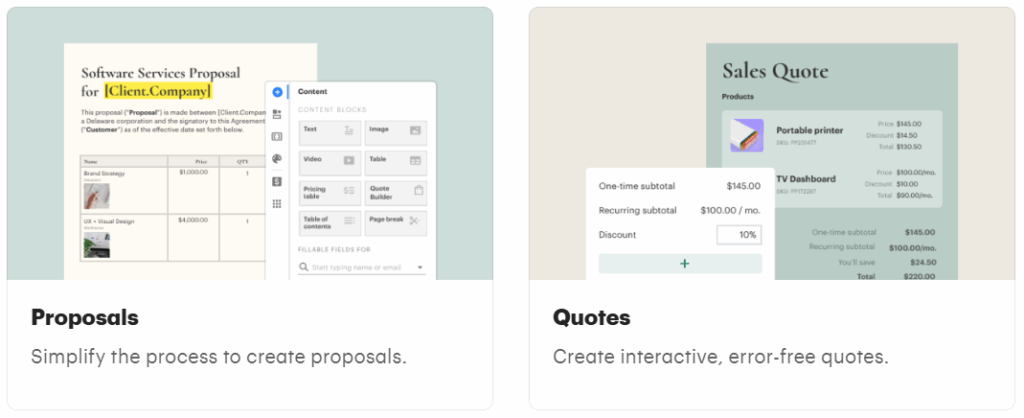
PandaDoc flips this nightmare into a revenue machine. Here’s how businesses use it to create interactive sales proposals that clients actually engage with and sign 50% faster on average.
🔹The Old Way vs. PandaDoc Way 📊
| Manual Proposals | PandaDoc Smart Proposals |
|---|---|
| Static PDFs emailed | Live, interactive documents |
| “Did you get it?” emails | Real-time read receipts |
| Blind follow-ups | Click analytics + notifications |
| 2-3 week cycles | Close in 2-3 days |
🔹Real Workflow: From Blank Page to Signed Deal (5 Minutes) ⏱️
Step 1: Grab a Template
Start with PandaDoc’s 200+ proposal templates (SaaS, consulting, agencies). Drag-drop your logo, tweak colors. No design skills needed.
Step 2: Build Interactive Pricing
Add dynamic pricing tables. Clients click “Professional Plan” → see $2K price → taxes calculated live. No math errors, ever.
Step 3: Personalize Smartly
Hi {{client_name}}, based on your 50-person team… Auto-fills from CRM. Add video intros, team bios. Clients feel VIP treatment. 🎥
Step 4: Send & Track Magic
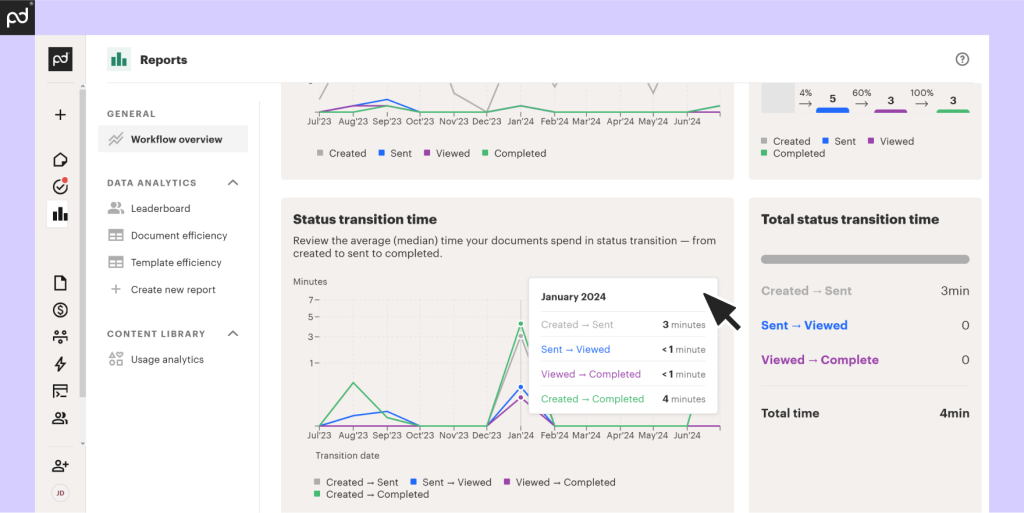
Hit send. Get instant alerts: “Sarah opened proposal (2 min ago).” “Viewed pricing page 3x.” Time perfect follow-ups.
- 📱 Sarah reads on mobile → you get notified
- ⌚ She lingers on pricing → hot lead signal
- ✅ Signs page 2 → payment link activates
Step 5: Close with One Click
Embedded eSignature + payment collection. No logins, no portals. Clients sign + pay from same screen.
🔹Business Impact Numbers That Matter 💰
✅ 30% faster sales cycles (PandaDoc avg)
✅ 25% higher proposal acceptance rates
✅ 70% less sales admin time
✅ $50K+ annual savings (10-person sales team)
Real Example: Sarah’s SaaS startup sent 50 manual proposals/month → 10% close rate. Switched to PandaDoc → 18% close rate, same effort. That’s 40 extra deals/year.
Pro Tip: Use “pricing page views” as your hottest lead score. 3+ views = 80% close probability. 🎯
Sales teams love it because: No more “check inbox” emails. Clients engage live. Deals close while coffee’s brewing. ☕
Many sales teams use CPQ (Configure, Price, Quote) tools to automate pricing and proposal creation. Understanding the basics of CPQ helps clarify how PandaDoc’s pricing tables and quote generation features fit into broader sales workflows.¹
2. Contracts & Legal Agreements Management ⚖️📄
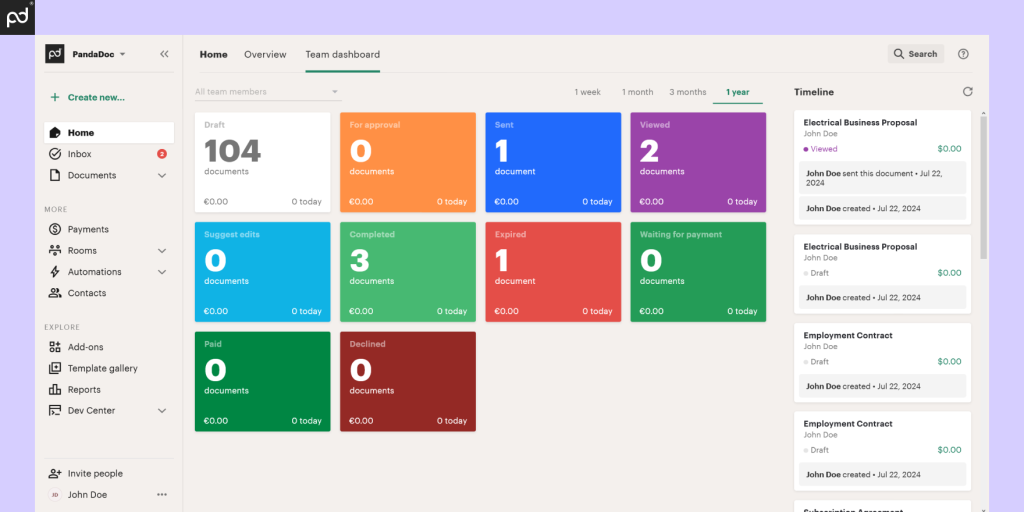
Managing contracts manually can quickly become complicated. Different versions circulate through email, approvals get delayed, and it’s hard to know which document is final. For many businesses, this creates unnecessary risk and slows down decision-making.
1️⃣. Common Challenges with Manual Contracts 🧾
Without a structured system, contract management often leads to:
- Multiple versions of the same agreement
- Unclear approval status
- Delays caused by legal or internal reviews
- Difficulty locating signed contracts later
These issues increase the chance of errors and missed deadlines.
2️⃣. How PandaDoc Simplifies Contract Management 🔧
PandaDoc allows businesses to manage contracts through standardized templates and controlled workflows. Teams can:
- Create approved templates for common agreements
- Reuse clauses and sections consistently
- Control who can edit, review, or approve documents
This helps maintain accuracy while reducing repetitive legal work.
3️⃣. Typical Contract Workflow 🧩
A simplified contract process using PandaDoc usually includes:
- Select a contract template
- Fill in deal-specific information
- Route the document for internal review
- Send it for signing once approved
- Store the signed agreement securely
Each step is tracked, reducing confusion and back-and-forth.
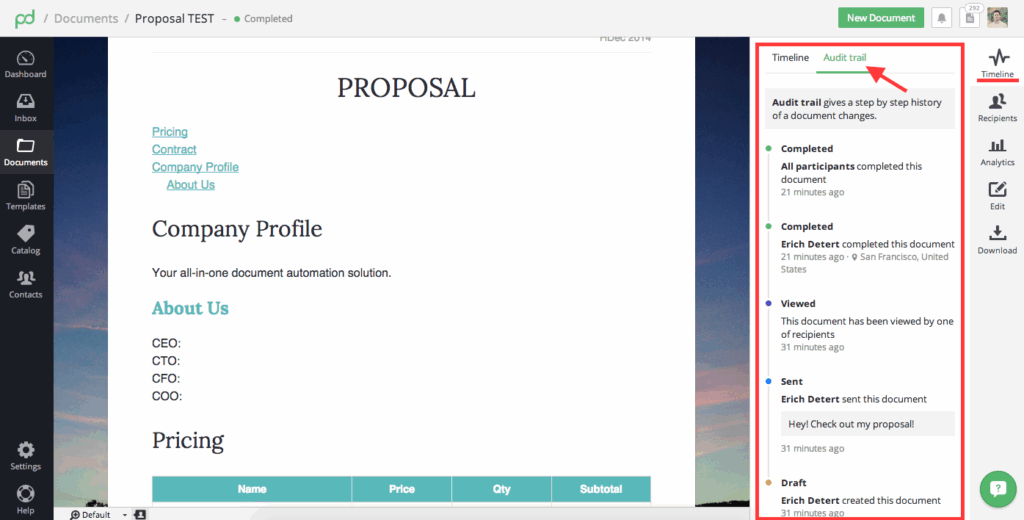
4️⃣. Version Control and Audit Trails 🔍
PandaDoc keeps a record of:
- Document changes
- Approval actions
- Signing events
This creates a clear audit trail, which is useful for internal accountability and future reference.
5️⃣. Why This Use Case Matters 💡
By organizing contracts in a single system, businesses reduce risk, save time, and improve consistency. Contract management becomes a predictable process rather than a manual task supporting smoother operations across teams.
3. eSignatures & Online Signing Workflows
“Just sign here” shouldn’t take 2 weeks. 😤 You’ve nailed the proposal. Client loves it. Then… signature purgatory. Email forwards. “Sent to legal.” Lost attachments. PandaDoc eSignatures fix this forever legally binding signatures in under 60 seconds, no portals, no logins, no excuses.

Why eSignatures Beat Email Hell 📧
❌ Old School: Print → Sign → Scan → Email → Wait
✅ PandaDoc: Click → Sign → Done → Payment link appears
Time saved: 8 hours → 8 seconds per signature
🔹The Magic eSignature Workflow (3 Clicks) ✨
Step 1: Drag-and-Drop Signature Fields
[Signature] 13th April 2026 [Initials] [Checkbox: “I Agree”]
Smart fields auto-place no pixel-perfect measuring. Works on mobile instantly.
Step 2: Multi-Party Signing Order
Sarah (CEO) → Legal Review → Finance → Final signature
Everyone gets notified automatically. No “forward to Bob” emails. Sarah signs → Legal gets pinged instantly.
Step 3: One-Click Signing Experience
✅ No account needed
✅ No downloads
✅ Sign with finger on phone
✅ Type name + auto-draw signature
✅ Works offline, syncs later
Step 4: Instant Legal Validity
✅ ESIGN Act compliant (US)
✅ UETA compliant (US)
✅ eIDAS compliant (EU)
✅ 100% court-admissible audit trail

🔹Real-World Speed Wins 🚀
Example: 20-person sales team
Manual signatures: 12 touches/deal (emails, calls, chases)
PandaDoc eSign: 1.2 touches/deal
Result: 83% less admin = 22 extra deals/month
Pro Tip: Add payment collection to signature fields. Client signs → Stripe link appears → paid in 90 seconds. 💰
🔹Visual Proof Clients Can’t Ignore 👀
📱 Sarah opens proposal on phone
👆 Taps signature field (2 secs)
✍️ Finger scribble (3 secs)
✅ “Legally signed” timestamp appears
💳 Payment link activates automatically
🔹Compliance Without Headaches ✅
🔒 Full audit trail: IP address + timestamp + 2FA option
📋 Unlimited signers per document
🔐 Role-based access: “View only” for juniors
🌍 Global compliance: US, EU, Canada, Australia
Bottom Line: eSignatures turn “signature pending” from deal-killer to speed bump. Clients sign faster because it’s easier than replying to email. Your team celebrates closed deals, not signature chases. 🎉
Beyond proposals and HR documentation, PandaDoc can also simplify operational processes like supplier onboarding. Many logistics businesses are now using structured onboarding workflows to reduce manual paperwork. Here’s how teams are Streamlining Supplier & Carrier Onboarding with PandaDoc for faster vendor approvals.
4. HR Documents & Employee Onboarding 👥📋
HR teams handle a steady flow of documents, from offer letters and policy acknowledgments to onboarding forms and internal agreements. When these documents are managed manually, it often leads to delays, missed signatures, and scattered records.
A. Common HR Document Challenges 🧾
Without a centralized system, HR teams may face:
- Repetitive document creation for each new hire
- Difficulty tracking who has signed what
- Follow-ups through multiple email threads
- Inconsistent versions of policies and forms
These issues can slow onboarding and create compliance gaps.
B. How PandaDoc Supports HR Workflows ⚙️
PandaDoc helps HR teams organize and automate document workflows by allowing them to:
- Use templates for offer letters, NDAs, and policies
- Send documents in bulk to multiple recipients
- Track document status in real time
This reduces manual work and keeps onboarding on schedule.
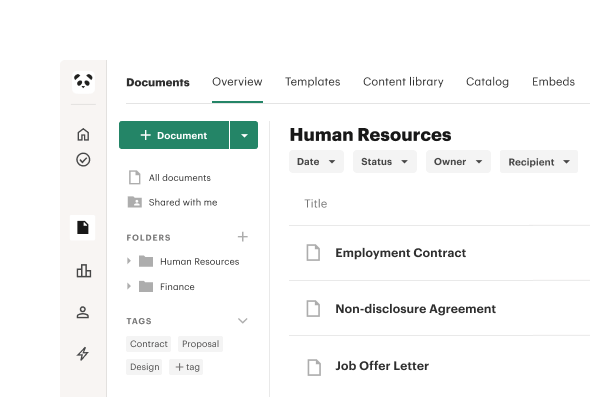
C. A Typical Onboarding Workflow 🧩
An HR onboarding process using PandaDoc often looks like this:
- Select pre-approved HR document templates
- Customize details for each new hire
- Send documents for review and signature
- Track completion and follow up if needed
- Store signed documents securely
Everything stays in one place, making it easier to manage records.
D. Better Visibility for HR Teams 👀
With centralized tracking, HR teams can quickly see:
- Which documents are signed
- Which are still pending
- When actions were completed
This visibility reduces guesswork and improves coordination across teams.
Why This Use Case Matters 💡
By automating HR documents and onboarding, businesses create a smoother experience for new employees while reducing administrative overhead. HR teams spend less time chasing paperwork and more time focusing on people.
5. Invoicing & Payments – Get Paid 2× Faster 💰
Sending an invoice doesn’t mean getting paid. Most businesses struggle not with billing but with delays, follow-ups, and broken payment journeys.
That’s where PandaDoc flips the model by combining documents, approvals, and payments into one smooth action.
❌ The Core Issue: Invoices Create Friction, Not Revenue
Traditional invoicing workflows usually involve multiple tools and unnecessary steps:
- 📄 Invoices sent as static PDFs that clients can view but not act on immediately
- ✍️ Approvals happen in a separate process, slowing down payment intent
- 💳 Payments require another email, link, or platform, increasing drop-offs
- ⏰ Manual follow-ups consume time and still don’t guarantee faster payment
Each delay compounds hurting cash flow and forecasting accuracy.
✅ How PandaDoc Makes Invoices Convert to Cash
PandaDoc treats invoicing as a conversion moment, not an accounting afterthought.
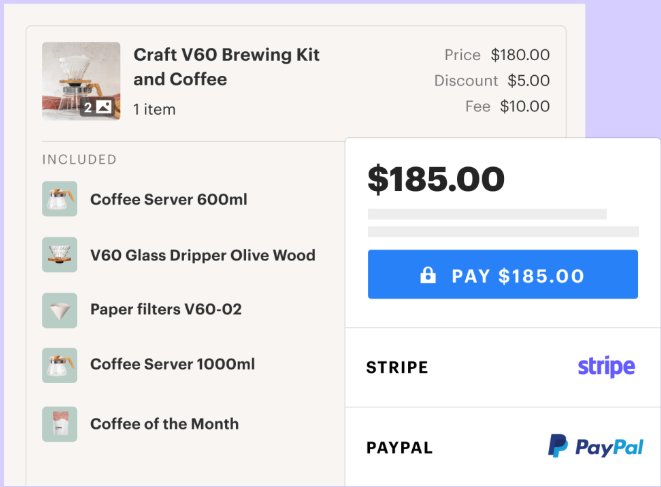
- 💳 Built-in Stripe and PayPal payments allow clients to pay instantly
- ✍️ Sign and pay in the same document, eliminating extra steps
- 🔁 Automated payment reminders reduce awkward manual chasing
- 👀 Real-time invoice tracking shows when clients view, sign, or pay
When action is easy, payments happen faster.
🔄 Step-by-Step: From Invoice to Payment
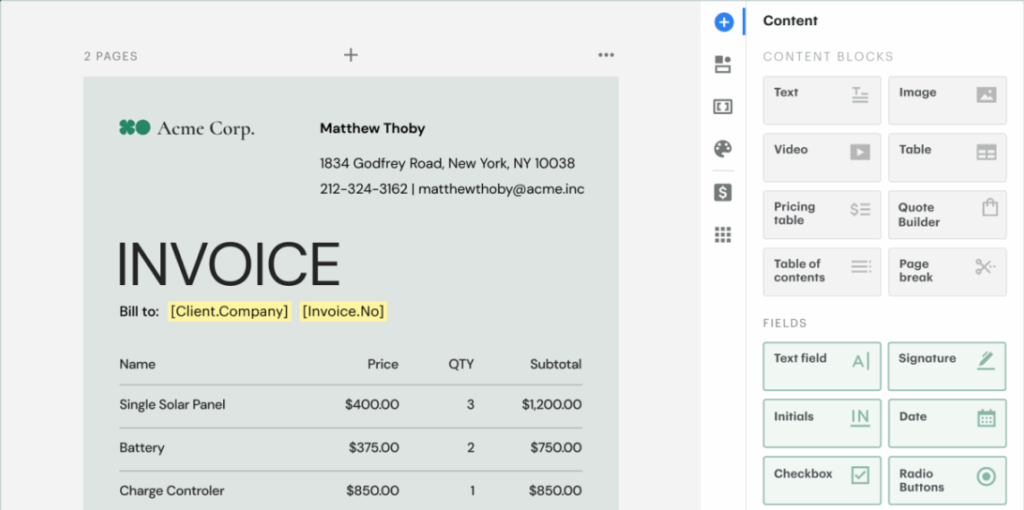
1️⃣ Create an invoice or proposal
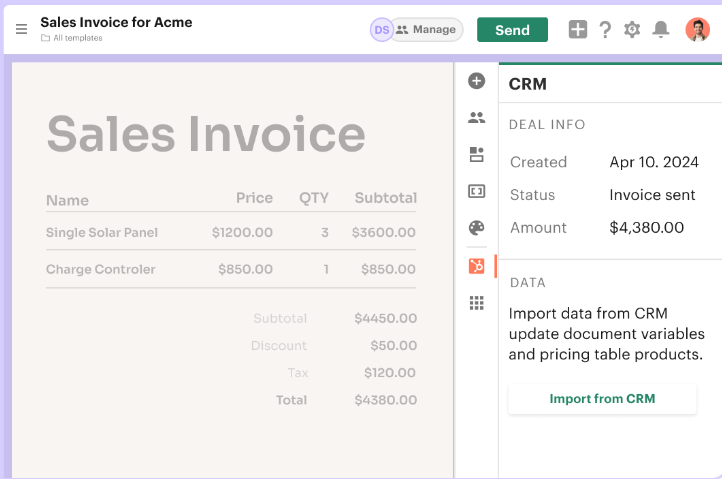
Use interactive pricing tables with clear totals, taxes, and line items.
2️⃣ Enable payment collection
Embed Stripe or PayPal directly inside the document—no external links.
3️⃣ Send and track
Know exactly when the client opens, reviews, and signs.
4️⃣ Collect payment instantly
Clients pay at the moment of agreement, not days later.
5️⃣ Monitor receivables in one dashboard
Track paid, pending, and overdue invoices without spreadsheets.
📊 Real Business Impact: Faster, Predictable Cash Flow
Businesses using PandaDoc invoicing consistently report:
- ⚡ Payments arriving up to 2× faster
- 📉 Significant reduction in overdue invoices
- 💰 Up to 90% of invoices paid within 48 hours
This isn’t aggressive follow-up—it’s smart workflow design.
🔐 Better Payments = Better Client Experience
Clients prefer PandaDoc invoices because:
- Totals and terms are clear and transparent
- Payment options are familiar and secure
- Everything happens in one trusted flow
Less confusion. More confidence. Faster payment.
“Improving your business workflow doesn’t have to be expensive. If you’re ready to implement these use cases, make sure to use a PandaDoc coupon code from our home page to get the best deal on your subscription.”
6. Workflow Automations & Approvals – Team Efficiency Boost ⚙️
Most teams don’t lose time creating documents. They lose time waiting for approvals, chasing internal sign-offs, and fixing avoidable errors.
This is where PandaDoc turns slow, manual handoffs into automatic, rule-based workflows that scale across teams.
❌ The Hidden Bottleneck: Internal Approvals
Without automation, document workflows usually break down like this:
- 🕒 Documents wait in inboxes for manager or legal approval
- 🔁 Revisions loop endlessly, creating confusion over versions
- 🧑💼 Sales, finance, and legal teams work in silos, slowing execution
- ⚠️ Human errors creep in due to manual checks
The bigger the team, the worse the delay.
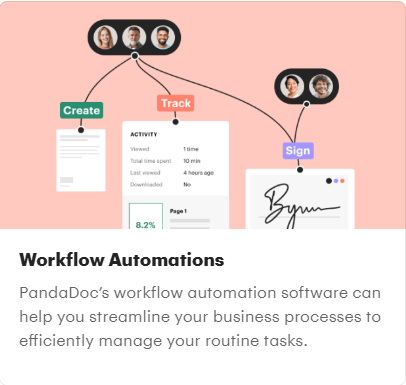
✅ How PandaDoc Automates Document Workflows
PandaDoc removes manual dependency by applying logic and automation to documents.
- ⚙️ Approval chains based on deal size, role, or document type
- 🔀 Conditional routing that sends documents to the right approver automatically
- 👤 Role-based permissions to control who can edit or approve
- 🔔 Automatic notifications at every workflow stage
Approvals stop being requests and start becoming rules.
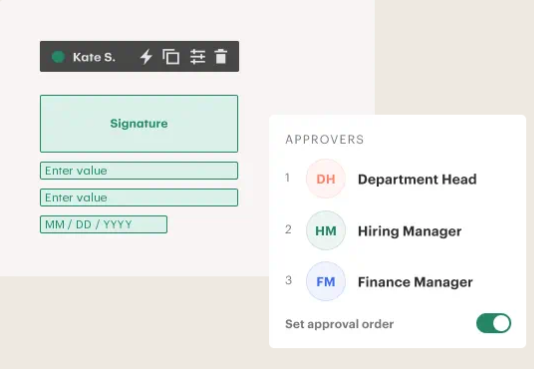
🔄 Step-by-Step: Automated Approval Workflow
1️⃣ Set approval rules
Define when legal, finance, or management approval is required.
2️⃣ Create conditional logic
High-value deals route differently than standard contracts.
3️⃣ Trigger workflows automatically
Documents move forward the moment conditions are met.
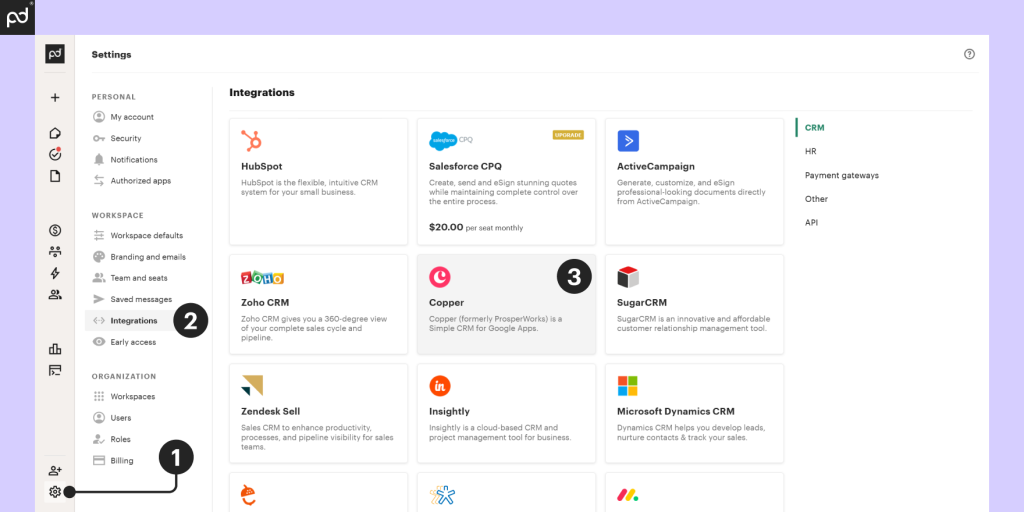
4️⃣ Track approval status in real time
No guessing, no follow-ups.
5️⃣ Finalize & send instantly
Once approved, documents are ready for signature immediately.
🔗 CRM & Tool Integrations That Actually Matter
PandaDoc integrates deeply with tools teams already use:
- 🔗 Salesforce – trigger documents from deal stages
- 🔗 HubSpot – automate proposals and contracts
- 🔗 Slack, Google Drive, and more
This keeps workflows inside existing pipelines instead of creating new ones.
📊 Real Results: Time Saved at Scale
Enterprise teams using PandaDoc report:
- 🚀 Up to 80% reduction in document turnaround time
- 📉 Fewer internal errors and revisions
- 📈 Faster deal execution across departments
Automation doesn’t replace people it removes delays between them.
💡 Reality Check
If approvals are informal and rare, automation may feel unnecessary.
But if:
- Deals vary in size and risk
- Legal and finance approvals are mandatory
- Speed impacts revenue
Then workflow automation is not optional it’s a competitive advantage.
7. Industry-Specific Use Cases 🏭📂
Every industry handles documents differently, but most face similar challenges too much manual work, slow approvals, and poor visibility into document status. PandaDoc is flexible enough to support industry-specific workflows while keeping processes structured and easy to manage.
📌 SaaS & Sales-Driven Teams 💻
Sales-focused teams commonly use PandaDoc to manage documents that move deals forward, such as proposals, subscription agreements, and renewal documents. Instead of creating each file manually, teams rely on reusable templates and structured pricing sections to maintain consistency. Built-in tracking also helps sales teams understand when a document is viewed, reviewed, or ready for follow-up, reducing guesswork during negotiations.
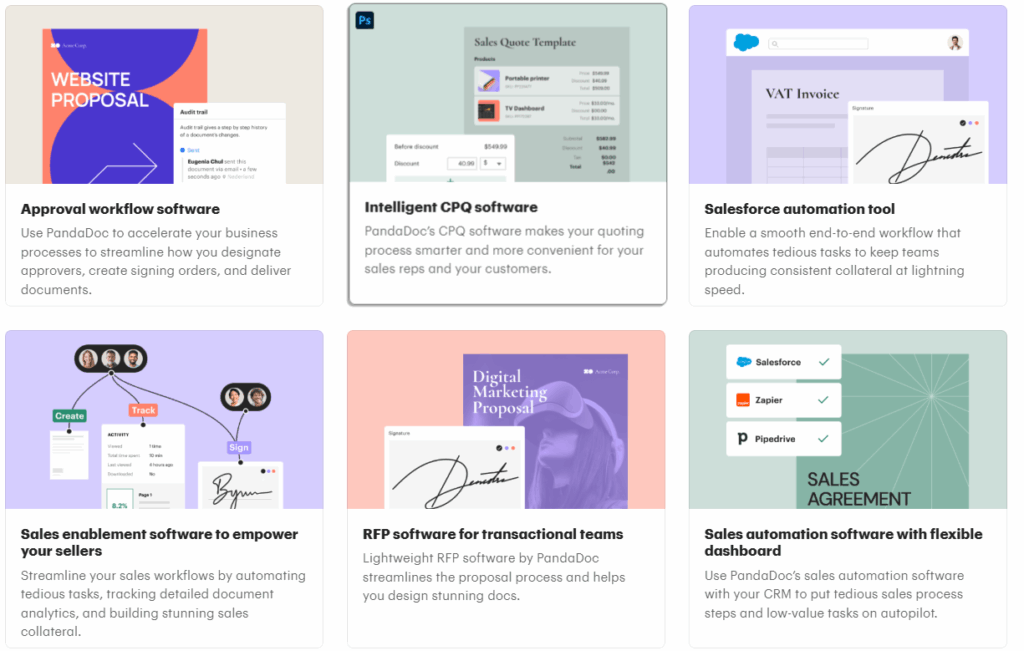
📌 Agencies & Service Providers 🎨
Agencies often juggle multiple clients, projects, and timelines at the same time. PandaDoc supports agencies by centralizing documents like statements of work, service contracts, and approval forms in one place. Standardized templates help agencies reduce repetitive setup work, while shared access ensures both internal teams and clients stay aligned on document status and next steps.
📌 Real Estate & Property-Related Workflows 🏢
Document workflows in property-related work usually involve multiple parties, time-sensitive approvals, and detailed agreements. PandaDoc helps manage this complexity by allowing documents to be sent, signed, and tracked through a single workflow. This reduces delays caused by missing signatures or unclear approval status and keeps transactions moving smoothly.
📌 Legal & HR Teams ⚖️👥
Legal and HR teams depend on accuracy, consistency, and clear audit trails. PandaDoc supports these teams by providing controlled templates for policies, employment agreements, and internal approvals. Version history and activity tracking make it easier to manage compliance requirements while reducing repetitive document handling.
8. Enterprise & Scalable Business Use Cases 🏢📈
As organizations grow, document workflows become more complex. Larger teams, higher document volumes, and stricter approval requirements make manual processes difficult to manage. At this stage, scalability and control become just as important as speed.
🔹Handling High Document Volume 📄
Enterprises often manage hundreds or thousands of documents at the same time. PandaDoc helps handle this scale by:
- Centralizing document creation and storage instead of spreading files across systems
- Using standardized templates to maintain consistency across teams
- Reducing repetitive work when similar documents are created frequently
This keeps document operations manageable even as volume increases.
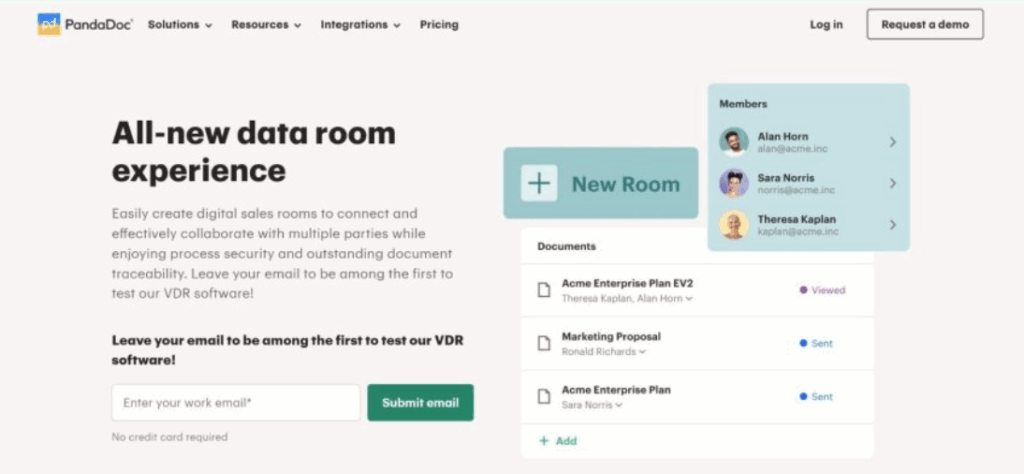
🔹Role-Based Access and Permissions 🔐
Larger teams require clear boundaries around who can view, edit, approve, or sign documents. PandaDoc supports this by:
- Assigning roles based on responsibility
- Limiting access to sensitive information
- Ensuring approvals happen in the correct order
These controls help reduce errors and maintain accountability.
🔹Multi-Team Collaboration at Scale 👥
Enterprise workflows often involve coordination across sales, legal, finance, and management. PandaDoc supports collaboration by:
- Keeping all stakeholders working from the same document version
- Tracking every action and update in one place
- Reducing dependency on long email chains
This improves alignment and shortens approval cycles.
🔹System Integration and Custom Workflows ⚙️
At scale, documents are part of larger systems and processes. PandaDoc supports this by:
- Connecting with existing business tools
- Allowing workflows to be customized based on internal rules
- Supporting automation triggers for document actions
This makes document handling part of a broader operational flow rather than a standalone task.
🔹Why This Use Case Matters 💡
For growing and large organizations, document management is not just about convenience it’s about control, consistency, and visibility. Scalable workflows help teams operate efficiently while reducing risk and administrative overhead.
9. Conclusion
Document chaos doesn’t have to be your business reality. 😌 From sales proposals that close 35% faster to invoices paid in 3 days, PandaDoc proves one platform can solve your entire document workflow sales, HR, legal, finance, enterprise scale.
The real magic? Every team wins simultaneously. Sales reps celebrate faster deals. Finance loves cash flow. HR onboards talent Day 1. Legal sleeps better with compliance. No more departmental turf wars over tools.
You’ve seen the workflows, stats, and best practices. Now picture your business running this smoothly:
- ✅ Proposals clients actually read + sign
- ✅ Contracts without email ping-pong
- ✅ Payments before coffee gets cold
- ✅ New hires productive from hour one
PandaDoc isn’t document software it’s business acceleration. Start with one use case (proposals convert fastest), master the best practices, then scale across departments.
The teams winning today invested 2 hours in setup. Their reward? Daily efficiency gains compounding monthly. Your move. 🚀
“Related Articles”
- What Is Document Automation and Why Businesses Use PandaDoc
- How to Manage Signed Documents and Audit Trails in PandaDoc
10. FAQs ❓
1. What types of businesses use PandaDoc?
Sales teams, agencies, real estate, legal firms, HR departments—anyone drowning in documents. 10-person startups to Fortune 500 enterprises. Perfect for anyone who values time. 🌐
2. Is PandaDoc suitable for small businesses?
Absolutely. 2-person agencies use it for proposals + invoicing. Scales seamlessly as you grow. No user limits, same interface from 2→200 users.
3. Can PandaDoc handle legally binding contracts?
100% yes. ESIGN Act, UETA, eIDAS compliant worldwide. Full audit trails hold up in court. Lawyers approve the workflows. ⚖️
4. Does PandaDoc support team collaboration?
Better than Google Docs. Live co-editing, @mentions, approval routing, role-based permissions. Teams work together without email clutter.
5. How quickly can businesses see ROI from PandaDoc?
Week 1: Faster signatures. Week 2: Payments arrive. Month 1: 30% faster sales cycles. Quarter 1: New baseline productivity. 🚀

Hi, I’m Nelson 👋 a content writer and reviewer with 6+ years of experience writing blogs, coupon guides, and detailed website reviews. I have a strong background in continuous learning and research, which helps me analyze platforms, tools, and websites in a structured and practical way 📚.
My content is based on real research, hands-on analysis, and accuracy, with a clear focus on simplicity, transparency, and user-first value. I aim to break down complex information into content that’s easy to understand and genuinely helpful for readers ✅.