Ready to send and sign documents online without delays, printing, or endless email follow-ups? Let’s make it simple. 🚀
In today’s fast-moving digital world, businesses and individuals need a faster way to handle contracts, agreements, proposals, and approvals.
Instead of scanning papers or waiting days for signatures, you can send documents instantly and collect legally binding signatures from anywhere. 📄
In this guide, you’ll learn exactly how to send and sign documents online step by step, what tools you need, and how to do it securely.
If you want smoother workflows, quicker approvals, and zero paperwork stress, let’s get started. ✍️
📌1. What Does It Mean to Send and Sign Documents Online? ✍️📄🚀
In simple words: Sending and signing documents online means you can send contracts, agreements, or forms to anyone, anywhere and they can sign them digitally without printing a single page.
No printer. No scanner. No courier. Just you, your document, and the internet. 🌐
🔹How It Actually Works (30-Second Version) ⏱️
STEP 1: You upload your document (PDF, Word, etc.) to an eSignature platform
STEP 2: You drag-and-drop signature fields where recipients need to sign
STEP 3: You enter email addresses and hit send
STEP 4: Recipients get an email, click the link, and sign digitally
STEP 5: Everyone gets the final signed copy automatically

That’s it. Done. ✅
🔹Two Terms You Must Know (No Confusion) 🧠
| Term | Meaning | Example |
|---|---|---|
| Electronic Signature (eSignature) | Any digital mark showing intent to sign | Typed name, drawn signature, click-to-sign |
| Digital Signature | High-security encrypted signature (PKI-based) | Government filings, court documents |
💡 Quick Truth: For 99% of business needs (contracts, NDAs, proposals), eSignature is perfectly legal and enough. Digital signatures are only for high-stakes legal stuff.
🔹Why Should You Care? 📊
- Data point: Businesses using online signing close deals 35% faster (Gartner, 2023).
- Translation: Less waiting. More money. Simple. 💰
📌2. Is It Legal to Sign Documents Online? 📜
Yes, fully legal. Online signatures carry the same legal weight as handwritten ones in the US, EU, Canada, and most countries worldwide.
🔹🇺🇸 United States — ESIGN Act & UETA
The ESIGN Act (2000) gives e-signatures the same legal standing as wet ink signatures for most business and personal transactions. The UETA backs this up at the state level. Key requirements: clear intent to sign, mutual consent, and a reliable audit trail.
🔹🇪🇺 European Union — eIDAS Regulation
The eIDAS Regulation provides a framework for electronic signatures across all EU member states, recognizing three types: simple, advanced, and qualified each with varying levels of legal validity. Adobe Qualified e-signatures are treated as equivalent to handwritten signatures across the entire EU.
🔹🇨🇦 Canada — PIPEDA & Provincial Laws
Electronic signatures are legally binding in Canada as long as there is clear intention by the parties to be legally bound by the agreement they hold the same weight as wet ink signatures.
At the federal level, PIPEDA states that a signature required by federal law is satisfied by an electronic signature. TechTarget Each province also has its own supporting legislation Ontario, BC, Alberta, and Quebec all recognize e-signatures for most commercial transactions.
⚠️ What Still Needs a Wet Signature?
Certain documents are excluded wills, codicils, powers of attorney, and some real estate documents typically still require traditional signatures.
Quick Reference Table
| Region | Law | Valid? |
|---|---|---|
| USA | ESIGN Act / UETA | ✅ Yes |
| EU | eIDAS Regulation | ✅ Yes |
| Canada | PIPEDA + Provincial Acts | ✅ Yes |
| Most other countries | Local e-commerce laws | ✅ Generally yes |
Key takeaway: For standard business documents contracts, NDAs, proposals, HR forms online signatures are legally valid and court-admissible. Just use a platform that provides an audit trail and signer authentication.
📌3. Why Businesses Are Moving to Online Document Signing ⚡
Businesses are shifting from traditional paperwork to online document signing for one simple reason: efficiency. But speed is only one part of the story.
Digital document workflows solve multiple real-world problems that physical paperwork creates.
🚀 1. Faster Deal Closures
Traditional signing involves printing, scanning, mailing, or waiting for physical meetings. This process can delay agreements by days or even weeks.
With online document signing:
- Documents are delivered instantly
- Recipients can sign from any device
- Automatic reminders reduce follow-up time
- Deals close in hours instead of days
For sales teams, this directly impacts revenue cycles.
📄 2. Reduced Administrative Work
Manual document handling creates repetitive tasks:
- Renaming files
- Tracking email attachments
- Updating CRM records
- Storing physical copies
Online platforms centralize everything in one dashboard. Documents are automatically saved, organized, and searchable.
This reduces administrative burden and human error.

📊 3. Real-Time Visibility & Tracking
One major advantage of digital signing platforms is transparency.
Businesses can see:
- When a document was opened
- How long it was viewed
- Which pages were reviewed
- When it was signed
This visibility improves decision-making and follow-up timing.
Instead of guessing, teams act on real data.
🔐 4. Improved Security & Compliance
Physical documents can be lost, altered, or mishandled.
Digital document signing platforms use:
- Encryption
- Identity verification
- Timestamped audit trails
- Secure cloud storage
For industries like finance, healthcare, and legal services, compliance is critical. Online signing solutions align with regulatory frameworks such as ESIGN, UETA, and eIDAS.
🌍 5. Remote & Global Accessibility
Today’s workforce is remote and global.
Online document signing allows:
- Clients in different countries to sign instantly
- Teams to collaborate without location restrictions
- Businesses to operate 24/7
There’s no dependency on office hours or physical presence.
💰 6. Cost Savings Over Time
While digital tools require a subscription, they reduce:
- Printing costs
- Courier fees
- Storage expenses
- Administrative labor hours
Over time, this leads to measurable operational savings.
The Bigger Picture
Online document signing is not just about convenience. It improves workflow speed, compliance, transparency, and scalability. That’s why small businesses, startups, enterprises, and remote teams are increasingly moving toward structured digital document platforms.
📌4. Step-by-Step: How To Send and Sign Documents Online 📋
This is the complete process from uploading your document to getting a legally signed copy back.
What You Need Before Starting
- A document (PDF, Word, or any standard format)
- An e-signature platform account (PandaDoc recommended)
- The recipient’s email address
- 5 minutes
Step 1 — Upload Your Document
Log into your e-signature platform. Click “New Document” and upload the file you want to get signed. Select the Upload tab, locate your file, and it will upload and become viewable through the interface.
Supported formats: PDF, DOCX, XLSX, PPTX, and more.
Step 2 — Add Signature Fields
In the document editor, click on Fields from the menu on the right of the screen and drag-and-drop the Signature field to the relevant area of your document.
You can also add:
- Date fields
- Text input fields
- Initials
- Checkboxes
Assign each field to the correct recipient if multiple signers are involved.

Step 3 — Add Recipients & Customize the Email
Enter the recipient’s name and email address. Edit the email subject if needed by default it’s set to “[Sender name] sent you ‘[Document name]'”. You can add a personalized message or use AI to suggest an email draft in the tone of your choosing.
Set optional settings:
- Document expiration date
- Auto-reminders
- Forwarding permissions
Step 4 — Send the Document
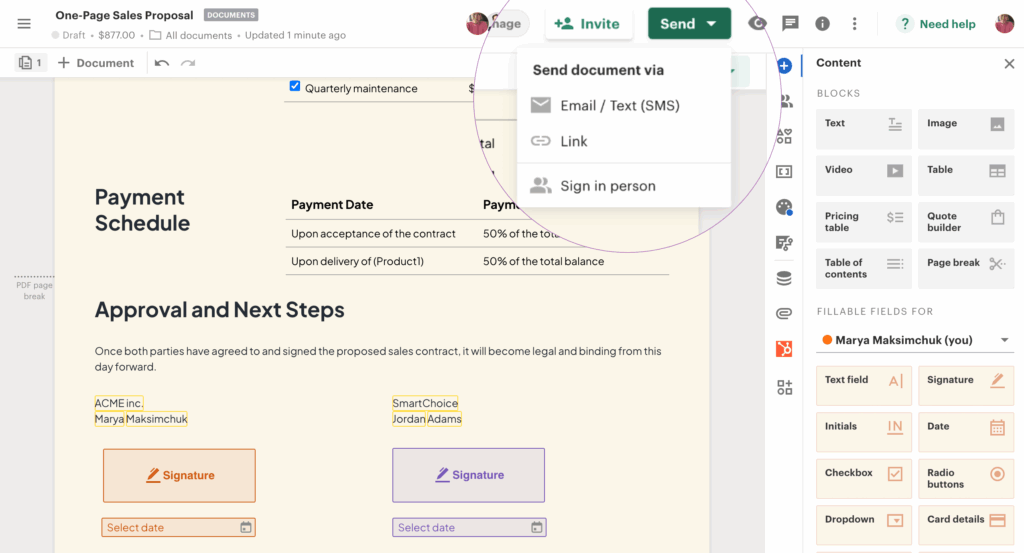
You can send documents via Email/Text (SMS) or via a shareable link, or have recipients sign in person on your device.
- Email/SMS — Recipient gets a direct link in their inbox
- Link — Share via any messaging app, Slack, WhatsApp, etc.
- In-person — Hand your device to the signer on the spot
Step 5 — Recipient Reviews & Signs
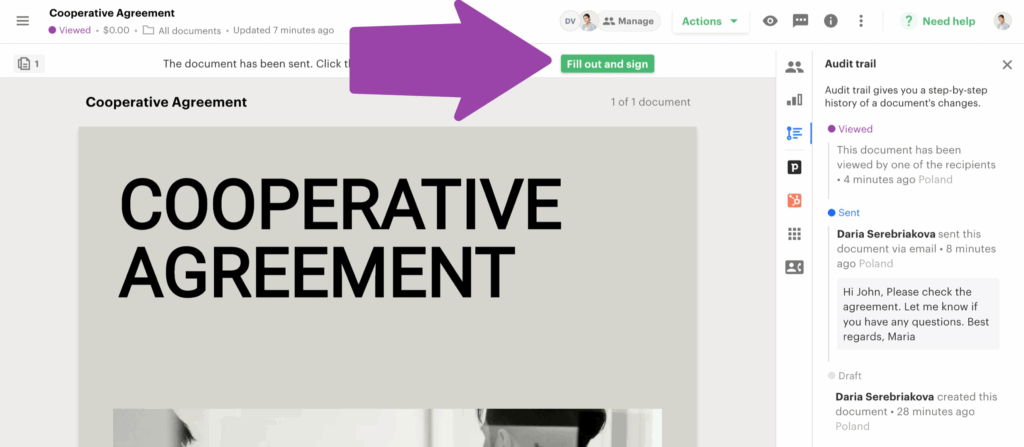
The recipient receives the email, clicks the link, and opens the document. They click the Fill and Sign button at the top, complete the necessary fields, click Accept and Sign, and then click Finish to complete the process.
Required fields are highlighted in red, optional fields in grey. Once everything is completed, the document transfers to Completed status and becomes legally binding.
Step 6 — Download the Signed Copy
After the document has been signed and finalized by all participants, you can download a PDF of the signed copy. The PDF includes a Signature Certificate on the last page confirming the document was accepted and signed, with timestamps showing when it was sent, viewed, and completed.
Both parties receive the final signed copy automatically.
That’s It ✅
The entire process from upload to signed document takes under 5 minutes. No printing, no scanning, no waiting.
Must Read: PandaDoc Review: Complete Features & Pricing Guide
📌5. What Do You Need to Send Documents for Signature? 🔧
Before you send anything, make sure you have these basics in place:
1. The Document Itself
You can upload documents in formats such as Microsoft Word, PDF, or other common formats from your computer or popular file-sharing sites like Box, Dropbox, Google Drive, and OneDrive.
Most platforms also support: XLSX, PPTX, JPG, PNG.
Best practice: Always convert your document to PDF before sending it locks the formatting and prevents accidental edits.
2. An E-Signature Platform Account
You need a reliable e-signature tool. Free options exist, but for business use, a paid plan gives you audit trails, branding, reminders, and compliance features.
Top options: PandaDoc, DocuSign, Adobe Sign, HelloSign

3. Recipient’s Email Address
You need to enter the names and email addresses of the signatories, add comments or flag applicable sections that need attention, and route the document for signature using a precise order of recipients.
If you have multiple signers, decide the signing order upfront.
4. Defined Signature Fields
Don’t just send a blank document. Drag and drop fields like signature, name, and date for each recipient using the left panel assign and customize them before sending.
At minimum, add:
- Signature field
- Date field
- Name field (if required)
5. Audit Trail & Storage Setup
Save and store the agreement in a protected online format and ensure each signatory gets a copy of the finalized contract — with accurate, robust records, timestamps, and audit trails.
This is what makes your e-signature legally enforceable not just convenient.
Quick Checklist ✅
| Requirement | Why It Matters |
|---|---|
| Document (PDF preferred) | Clean, locked formatting |
| E-signature platform | Legally valid process |
| Recipient email address | Delivery + identity trail |
| Signature fields placed | Guides signer clearly |
| Audit trail enabled | Legal enforceability |
That’s everything. Once these are in place, the actual sending process takes under 2 minutes.
📌6. Best Ways to Send Documents Online (Comparison) 🔍
Not all e-signature tools are built the same. Here’s a straight breakdown of the top four platforms:
🔹Quick Comparison Table
| Platform | Best For | Starting Price | Free Plan? |
|---|---|---|---|
| PandaDoc | Create + send + sign + track | $19/user/mo | ✅ Yes |
| DocuSign | Enterprise compliance | $15/user/mo | ❌ No |
| Adobe Sign | Adobe ecosystem users | $10/user/mo | ❌ No |
| Dropbox Sign | Simple, affordable signing | $20/user/mo | ✅ Limited |
🔹PandaDoc 🐼
PandaDoc is a full document workflow platform create, track, eSign, and collect payment in one place. Wikipedia Best choice for sales teams, freelancers, and SMBs who want an end-to-end solution without jumping between tools.
🔹DocuSign
DocuSign has been the gold standard in e-signing for 20+ years, with 600+ integrations and strong enterprise-level scalability. TechTarget Best for large organizations with complex compliance needs. Pricing sits higher than competitors, but it offers the most comprehensive ecosystem for document automation and contract management.
🔹Adobe Acrobat Sign
Adobe Sign is backed by the Adobe ecosystem its key advantage is seamless integration with Adobe Creative Cloud and Document Cloud, especially for PDF editing. Docusign Best if your team is already deep in Adobe products.
🔹Dropbox Sign (formerly HelloSign)
Dropbox Sign delivers excellent value for small to mid-sized businesses that prioritize simplicity, with deep integration with Dropbox for seamless document management. DocuSign Best for solo users or small teams with basic signing needs.
🔹Which One Should You Pick?
The most common mistake when evaluating e-signature platforms is treating them as equivalent products at different price points — PandaDoc, DocuSign, and HelloSign are solving meaningfully different problems.
- Need to create + send + sign + track → PandaDoc
- Need enterprise-grade compliance → DocuSign
- Already use Adobe tools → Adobe Sign
- Need simple & cheap → Dropbox Sign
For most businesses especially small to mid-size PandaDoc gives the best balance of features, usability, and value.

📌7. Why PandaDoc Is a Smart Choice for Online Signing 🐼
Most e-signature tools just collect signatures. PandaDoc does the entire document workflow create, send, track, sign, and collect payment all in one place.
If you require comprehensive document creation, collaboration, and CPQ capabilities alongside eSignatures, PandaDoc is the best choice.
🔴 Key Features
PandaDoc allows you to create professional documents using drag-and-drop tools, collect legally binding e-signatures with GDPR and HIPAA compliance, track documents in real-time, and automate workflows like reminders and approvals.
Standout features:
- 1,000+ templates — contracts, proposals, NDAs, quotes, HR forms
- Real-time tracking — see when recipients open, view, and sign
- Auto-reminders — automatic follow-ups for unsigned docs
- CRM integrations — HubSpot, Salesforce, Pipedrive, and more
- Payment collection — Stripe, PayPal, Square built right in
- Content library — reuse pricing tables, clauses, images across docs
🔴 Pricing Plans
| Plan | Price (Annual) | Best For |
|---|---|---|
| Free | $0 | Up to 5 docs/month, basic eSign |
| Starter | $19/user/mo | Small teams, unlimited eSign + templates |
| Business | $49/user/mo | CRM integrations, branding, workflows |
| Enterprise | Custom | API, advanced automation, custom roles |
Recipients can eSign documents for free they don’t need a PandaDoc account. Once they receive a document, they can sign it on any device.
A 14-day free trial is available to test key functionalities like document management, e-signing, and templates before committing to a subscription.
🔴 Ratings & Trust
PandaDoc has a value-for-money rating of 4.3 out of 5 on Capterra based on verified user reviews, reflecting its ability to deliver robust document management tools at a competitive price point.
PandaDoc complies with HIPAA, and documents signed with PandaDoc meet the standards of the U.S. ESIGN Act and the EU’s eIDAS regulation making all signatures legally binding and secure.
🔴 One Honest Caveat
Some users feel pricing can be high for mid-market companies, especially when advanced features like CRM integrations and automation require upgrading to higher-tier plans. TechTarget If you only need basic signing with no workflow features, a cheaper tool may suffice. But for end-to-end document management, PandaDoc delivers the best balance.
📌8. How To Send and Sign Documents Online Using PandaDoc 🖥️
Here’s the exact process pulled straight from PandaDoc’s workflow.
🔹For the Sender
Step 1 — Create or Upload Your Document
Log into your PandaDoc account and click “New Document.” Select the Upload tab and locate the file you wish to sign it will upload and become viewable through the interface.
Or pick from 1,000+ ready-made templates contracts, proposals, NDAs, offer letters, and more.
Step 2 — Add Signature & Form Fields
Select the Signature tab from the toolbar on the right and drag-and-drop a field to the appropriate place in the document.
You can also add: Date, Text, Initials, Checkbox, and Stamp fields. Assign each field to the correct recipient.
Step 3 — Add Recipients & Configure Settings
Edit the email subject, add a personalized message or use AI to suggest an email draft, and check document settings expiration date, auto-reminders, renewal, and forwarding permissions.
Step 4 — Send
Hit Send and enter the email address of the person you’re sharing it with. DocuSign You can also send via a shareable link or SMS.
Once sent, you’ll receive notification emails as your recipient views and completes the document with full analytics on how they interact with it.
🔹For the Recipient
Step 1 — Open the Email
Check your inbox (also check Spam/Promotions). Click “Open the Document” to access it.
Step 2 — Review & Sign
When ready to sign, click the “Fill and Sign” button at the top. Required fields are highlighted in red, optional fields in grey. Click the signature box and put in your signature.
You can sign by:
- Typing your name
- Drawing with mouse/finger
- Uploading a signature image
Step 3 — Finish
Click “Finish” at the top to confirm. The document transfers to Completed status and becomes legally binding. Download your PDF copy by clicking the Download button on the top right.
🔹On Mobile? No Problem
PandaDoc’s mobile app lets you create, send, track, and sign documents on the go available on both Google Play and the App Store.
Signature, Text, Date, Stamp, and Initials fields are all available in the mobile app. Tap a field, assign it to a recipient, and send directly from your phone.
🔹What the Final Signed Document Includes
The final PDF includes a Signature Certificate on the last page confirming the document was accepted and signed, with timestamps showing when it was sent, viewed, and completed.
That certificate is your legal proof. Store it safely.
Here’s H2 #10 — tight, trust-building, security-focused 👇
📌9. How Secure Is Online Document Signing? 🔐
Very secure more secure than paper, actually. Here’s what makes it that way.
🔴 Encryption
Advanced encryption protects documents during transmission and storage, ensuring that only authorized parties can access them. Tamper-proof technology locks documents after signing, preventing any changes that could compromise their validity.
Reputable platforms store data on enterprise-grade infrastructure like AWS, Microsoft Azure, or IBM Cloud all built to meet ISO 27001, SOC 2, and HIPAA standards.
🔴 Audit Trail
The electronic signature audit trail is a digital log that archives when and where a document was signed and by whom enabling your business to verify each signature and trace it back to the signer.
A legally defensible audit trail captures: action-by-action timestamps, verified signer identity (name, email, authentication method), and location and device markers including IP address, operating system, browser, and device ID.
This means if anyone ever disputes a signature, you have irrefutable digital proof.

🔴 Signer Authentication
Modern platforms support multiple identity verification methods email verification, SMS PIN codes, knowledge-based questions, or ID/selfie scans ensuring the person signing is exactly who they claim to be.
🔴 Compliance Certifications to Look For
| Certification | What It Covers |
|---|---|
| SOC 2 Type II | Data security & availability |
| ISO 27001 | Information security management |
| HIPAA | Healthcare data compliance |
| GDPR | EU data protection |
| ESIGN / eIDAS | Legal validity of signatures |
PandaDoc meets all of the above. ✅
🔴 Is It More Secure Than Paper?
Yes. A cryptographically sealed audit trail serves as a powerful defense against fraud, deepfakes, and AI-generated forgeries something a paper contract simply cannot offer.
Paper documents can be lost, altered, or forged. A digitally signed document with an embedded audit trail cannot be tampered with without detection.
🔴 How Long Should You Store Signed Documents?
Best practice is to store audit trails for at least 5 to 7 years, or longer if the contract duration extends beyond that so you can reference the audit log if legal or compliance issues arise later.
📌10. Final Thoughts: Is Online Document Signing Worth It? ✅
If your business still relies on printing, scanning, and emailing documents back and forth you’re losing time, money, and deals.
Online document signing is faster, cheaper, more secure, and legally valid. The technology is mature, the laws support it, and adoption is near-universal across industries.
For most businesses sales teams, HR departments, freelancers, legal teams PandaDoc is the smartest starting point. It’s not just an e-signature tool. It’s a full document workflow platform that handles everything from creating proposals to collecting payments.
Start with the free plan, test it with a few documents, and you’ll understand why millions of businesses have already made the switch.
The question isn’t whether to switch to online document signing. The question is why haven’t you yet? 🚀
Frequently Asked Questions ❓
Q1. Do I need an account to sign a document online?
No. Recipients can sign for free without creating an account.
Q2. Are electronic signatures legally binding?
Yes. Under the ESIGN Act and eIDAS, e-signatures are fully legally enforceable.
Q3. What file formats can I upload?
PDF, DOCX, JPG, PNG. PDF is recommended locks formatting before sending.
Q4. Can I sign on mobile?
Yes. All major platforms work on smartphones and tablets.
Q5. Can e-signatures be used in healthcare or finance?
Yes. Platforms like PandaDoc are HIPAA and GDPR compliant for regulated industries.

👨💻 Hi, I’m Anas Khan, a digital marketing expert with over 5 years of experience in e-commerce and affiliate marketing. I specialize in finding the best coupon codes 💸, Black Friday promotions 🛍️, and discount offers 💥 to help you save big!
I’ve dedicated myself to staying on top of the latest trends 📈 in online deals, so I can offer you the most reliable, tested advice. Whether you’re looking for promo codes or exclusive Black Friday deals, you can trust that my recommendations are based on solid research and personal expertise 🏆.