Unlock the power of document automation transform tedious paperwork into seamless workflows that save time, slash errors, and supercharge your business growth. 🚀
Tailored for digital marketers, web developers, and growing teams, this guide unpacks real insights, strategies, and 2026 trends to make you an automation pro. 📈
Ready to ditch manual drudgery and scale smarter? Let’s dive deep! 💡
1. What Is Document Automation?
Document automation is a powerful technology that uses software to automatically create, populate, customize, manage, and deliver documents through intelligent templates, real-time data integrations, and rule-based logic.
It eliminates repetitive manual entry by connecting your business data such as customer details from CRMs, form submissions, or spreadsheets to reusable templates, generating professional outputs like contracts, proposals, invoices, and reports in seconds.
Breaking Down the Core Components:
1. Dynamic Templates:
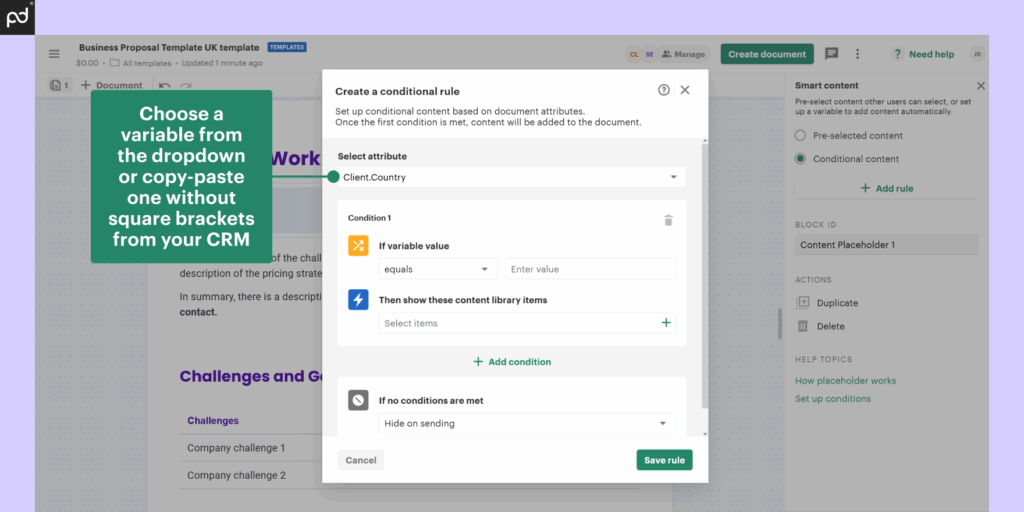
Build once with drag-and-drop editors. Embed variables (e.g., {customer_name}, {deal_amount}), dynamic tables, images, and conditional content (e.g., “If value > $10K, include warranty clause”).
2. Seamless Data Flows:
Integrates with CRMs (Salesforce, HubSpot), databases (SQL), forms (Typeform), or apps (Google Workspace) to pull live info no copy-paste.
3. Intelligent Logic:
Applies rules, calculations (e.g., tax/totals), validations, and now AI for content generation (e.g., summarizing terms or suggesting edits).
4. Full Lifecycle Management:
Generates, routes for approvals, tracks engagement, enables e-signatures, and archives all in one platform.
5. Practical Example for Web Devs/Marketers:
1A lead submits your site’s custom form → automation crafts a branded proposal with pricing grids, case studies, and CTAs → sends trackable link. For advanced users, add JS/PHP hooks for WordPress plugins pulling from custom fields.
6. Evolution and Accessibility:
From 1990s mail merge to 2026 AI-driven systems, it’s no-code for beginners (visual builders) yet extensible via APIs for devs. Stats: 45% of businesses automated 50%+ docs by 2025 (Forrester), cutting creation time 90%.
This foundational shift moves docs from static files to dynamic assets, powering scalable operations without tech overload. 🔧
Document automation refers to the use of software to create, manage, and distribute documents with minimal human intervention. This process helps reduce errors and speed up manual workflows by automating repetitive document tasks.🔗 https://dealhub.io/glossary/document-automation/
2. Common Problems With Manual Document Processes
Manual document handling is a hidden productivity black hole, wasting billions in lost time and errors across teams. Surveys like Asana’s 2025 Anatomy of Work show knowledge workers spend 28% of their week on repetitive doc tasks equivalent to two full days.
For web developers and marketers building forms, themes, and campaigns, these friction points derail focus on creative, revenue-driving work.
In-Depth Pain Points:
- Profound Time Inefficiency ⏳:
Drafting a proposal? 3-6 hours of data hunting, formatting tweaks, and iterations. At scale (20 docs/week), that’s 60+ hours/month time stolen from coding plugins or optimizing funnels. Real drag: Context-switching kills 40% efficiency (UC Irvine study). - Error-Prone Outputs ❌:
Human slip-ups hit 1 in 4 docs (Gartner) wrong numbers, outdated clauses, branding glitches. Impact: Billing disputes cost $50 avg/doc; contracts voided lead to lost deals. - Disastrous Approval Chains 🔄:
Email ping-pong creates “version fragmentation”—tracking the latest copy? Nightmare. Cycles stretch 2-5 days; 35% delays from miscommunication alone. - Zero Visibility and Tracking 👻:
“Has it been read? Signed? Lost?” No dashboards mean reactive chases; 20% docs misplaced, per DocuSign stats. Compliance gaps expose audit risks. - Non-Scalable Overload 📉:
Team doubles? Doc volume quadruples manually. Burnout hits admins; growing agencies can’t keep up with lead influx.
Case in Point: A dev agency manually scopes projects proposals lag 48hrs, 25% leads lost. Multiply: $10K/month opportunity cost.
These universal pains demand a fix automation turns them into strengths. 😩
3. How Document Automation Works in Real Business Scenarios
Document automation comes alive in practice here’s an expanded “before vs. after” for a sales proposal, showcasing PandaDoc’s role as a prime enabler.
Sales Proposal Flow
Before Manual: Lead form → copy to sheets → template paste → email approve (48hr wait) → PDF chase. 4-6hrs + drop-offs. 📉
After with PandaDoc (Full Step-by-Step):
- Trigger: Site form submits → Zapier pushes to CRM.
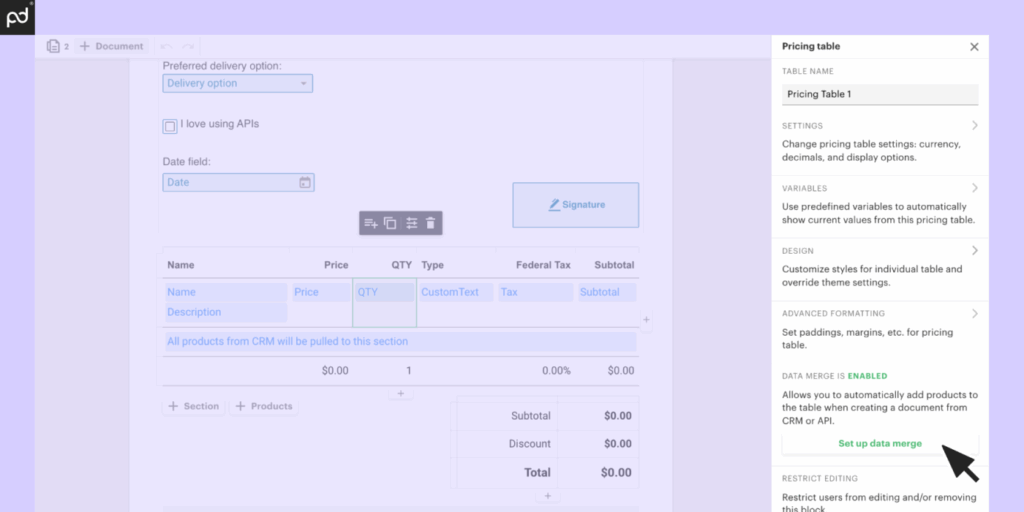
- PandaDoc Generation: Select template; auto-pulls CRM data into variables (name, amount, products). Dynamic table computes totals/discounts.
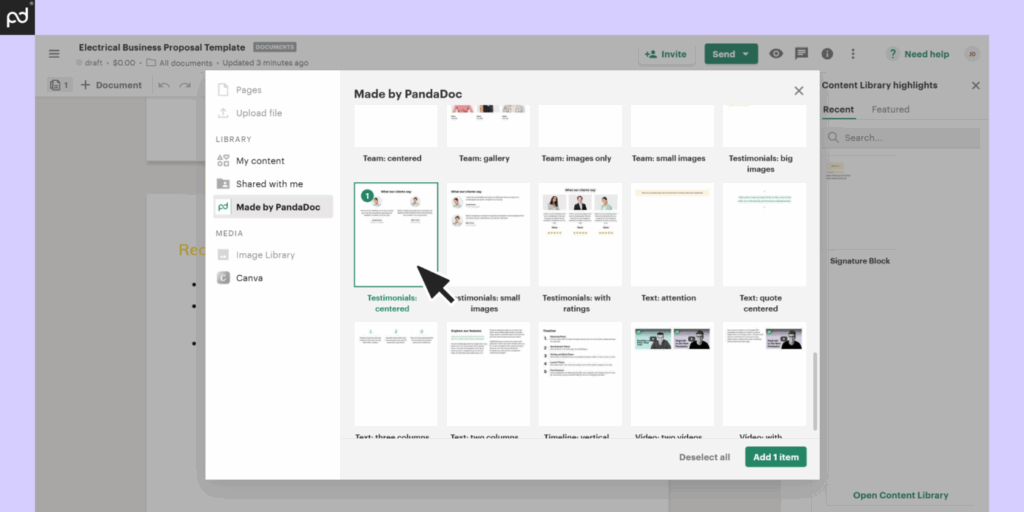
- Smart Customization: Conditional blocks (e.g., “$10K+ → premium terms”); PandaDoc AI suggests “Tailored ROI section.” Embed images/videos.
- Approval Stream: Share PandaDoc link—team comments/edits inline (5 mins, no versions).
- Client Delivery: Send personalized PandaDoc page—tracks opens (e.g., “Pricing lingered 2min”), auto-reminders.
- Seal & Automate: Built-in eSign (multi-party); PandaDoc archives to Dropbox/CRM, triggers invoice/Zap. Total: 12 mins. 40% faster closes. 🎉
HR Example with PandaDoc: Form → PandaDoc offer pack (salary calcs) → approve → sign.
Procurement: PandaDoc RFP from reqs → workflows.
PandaDoc’s no-code + API shine for devs. Forrester: 65% seamless.
4. Key Benefits of Document Automation for Modern Businesses
Platforms like PandaDoc unlock profound advantages, with IDC’s 2025 study showing 350% ROI and 70% process acceleration. Ideal for devs/marketers, here’s an expanded table with detailed PandaDoc examples:
| Benefit | Key Metrics (2025 Data) | How PandaDoc Delivers | Real-World Win |
|---|---|---|---|
| Lightning Speed ⚡ | 85-95% time reduction | Instant template population from CRM/forms | Proposals in mins vs. hours; focus on campaigns |
| Total Accuracy ✅ | 98% error drop | Auto-validation, data mapping prevents typos | No billing/contract disputes |
| Cost Efficiency 💰 | $10-20K/team/year saved | Eliminates manual labor/rework | Scale teams without admin hires |
| Boundless Scalability 📈 | 50x volume capacity | Unlimited workflows/rules | Handle lead floods effortlessly |
| Compliance Security 🛡️ | 100% traceable | Immutable logs/timestamps | ESIGN/UETA compliant audits |
| Effortless Collaboration 🤝 | 60% faster approvals | Inline edits/notifications | Team + client real-time sync |
| Rich Insights 📊 | 25-35% conversion boost | View/engagement analytics | A/B test templates like ads |
| AI Intelligence 🤖 | 45% content automation | Built-in suggestions/risk flags | Faster, smarter drafts |
| Mobile Flexibility 📱 | 75% on-device use | Responsive portals/eSign | Close deals from anywhere |
PandaDoc Spotlight: WordPress form → PandaDoc auto-generates tracked proposal → eSign → HubSpot. Result: 28% higher close rates (HubSpot data). These benefits compound for iterative workflows.
5. Why Businesses Are Rapidly Adopting Document Automation
The 50% YoY surge to a $13B market (Gartner 2025) reflects platforms like PandaDoc addressing urgent needs. Detailed drivers below.
Key Reasons Expanded:
- Remote/Hybrid Imperative 📍: 80% distributed teams (Microsoft) PandaDoc’s trackable links replace insecure shares, boosting productivity 55%.
- Velocity for Buyers 🏃: 65% expect <24hr proposals (HubSpot); PandaDoc cuts to minutes, lifting closes 35-45%.
- Regulatory Protection 🛡️: Strict rules demand proofs; PandaDoc’s immutable logs ensure compliance effortlessly.
- Economic Optimization 💸: 25% admin reductions; PandaDoc ROI in weeks via labor savings.
- AI-Tech Fusion 🤖: PandaDoc AI (clauses/analytics) future-proofs.
- Growth Scalability 📈: PandaDoc handles volume spikes.
| Driver | 2025 Impact | PandaDoc How-To |
|---|---|---|
| Remote | +60% adoption | Portal sharing |
| Speed | 40% faster pipelines | Auto-workflows |
| Compliance | 95% risk cut | Audit dashboards |
| Savings | $20K/team | No rework |
Gartner: 90% standard by 2027. PandaDoc leads.
Many organizations are increasingly adopting document automation as part of their digital transformation strategy to improve speed, accuracy, and workflow efficiency. According to industry trends and future innovations in document automation, businesses are moving toward automated processes to stay competitive and reduce manual workload.(https://www.artsyltech.com/blog/the-future-of-document-automation-trends-and-innovations)
6. How PandaDoc Enables Document Automation
PandaDoc delivers full-spectrum automation, empowering teams with intuitive tools that scale from solos to enterprises.
Detailed Capabilities:
- Advanced Templates: Drag-drop editor supports dynamic variables (e.g.,
{amount}), conditional logic (show/hide sections), rich media, payment links—reusable across docs. - Deep Integrations: Pre-built with HubSpot, Salesforce, Pipedrive, Google Sheets/Workspace, Brevo; Zapier for 5K+ apps; direct WordPress form pulls.
- Smart Workflows: Custom rules (e.g., “>$5K → manager approve”); auto-scheduling, notifications, expiration; sequential/multi-party routing.
- Powerful Analytics: Real-time dashboard—open rates, page time, drop-offs; A/B template testing; funnel insights.
- Robust eSignatures: ESIGN/UETA compliant; unlimited signers, reminders, mobile-optimized; audit certificates.
- AI Enhancements: Auto-generate summaries, suggest clauses, detect risks; 2026 predictive features.
- Developer-Friendly: REST APIs, webhooks for PHP/JS customizations; embed in portals.
Workflow Example: Form submit → PandaDoc generates → approves → tracks → signs → CRM archives. No sales push—pure capability.
7. Document Automation Use Cases Across Different Teams
Platforms like PandaDoc enable tailored automation, addressing pain across functions to capture broad search intent.
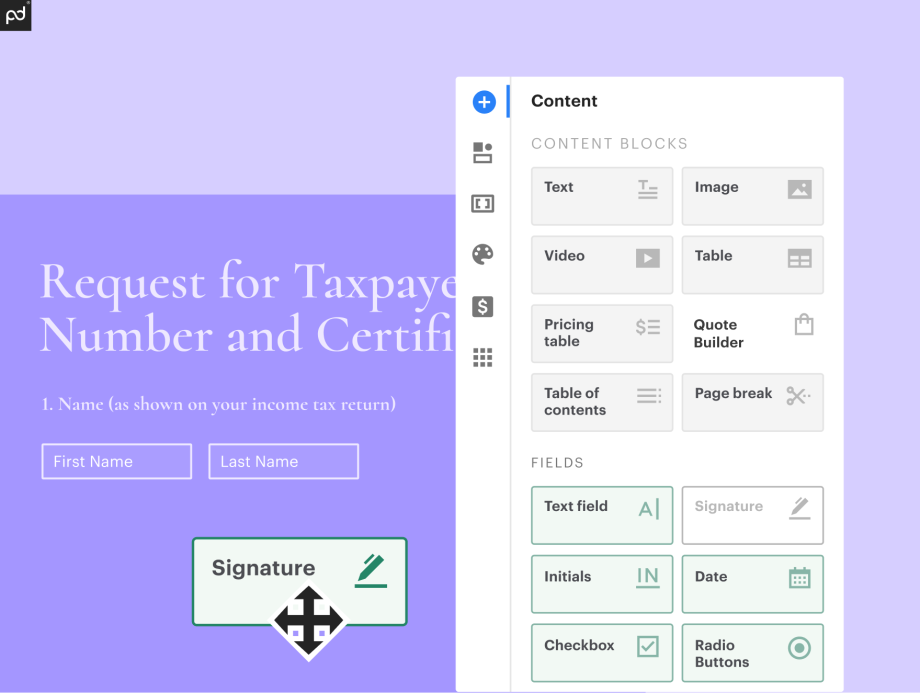
Detailed Use Cases:
1. Sales 💼:
PandaDoc crafts proposals with live pricing tables, CRM data; analytics track “signer hesitation”—35% win rate boost via timely nudges.
2. HR 👥:
Applicant forms trigger PandaDoc offer packs (salary calcs, equity, NDAs); sequential approvals → eSign; cuts time-to-hire 70%, scales recruiting.
3. Legal ⚖️:
Clause libraries auto-assemble contracts; PandaDoc redlining/version control slashes review time 60%; compliance baked in.
4. Procurement 🛒:
Requisition form → PandaDoc RFP with specs/timelines; multi-vendor bidding portals; accelerates sourcing 50%.
5. Finance 💳:
Invoices/AR statements from ERP; PandaDoc payment links; error-free billing.
6. Marketing 📣:
Lead-gated ebooks personalized by score; PandaDoc + Brevo for nurture sequences.
7. Bonus for Devs:
Custom WordPress plugins embed PandaDoc for client portals (self-sign scopes). Transforms every team. 🎯
8. Document Automation vs Traditional Document Management
Many conflate the two here’s clarity: Automation builds fresh docs; management organizes existing ones.
Document Management Systems (DMS, e.g., SharePoint/Box): Focus on storage, search, permissions for completed files. Passive repository. 📁
Document Automation (e.g., PandaDoc): Creates personalized docs from data/templates, plus workflows/signing. Proactive powerhouse. 🚀
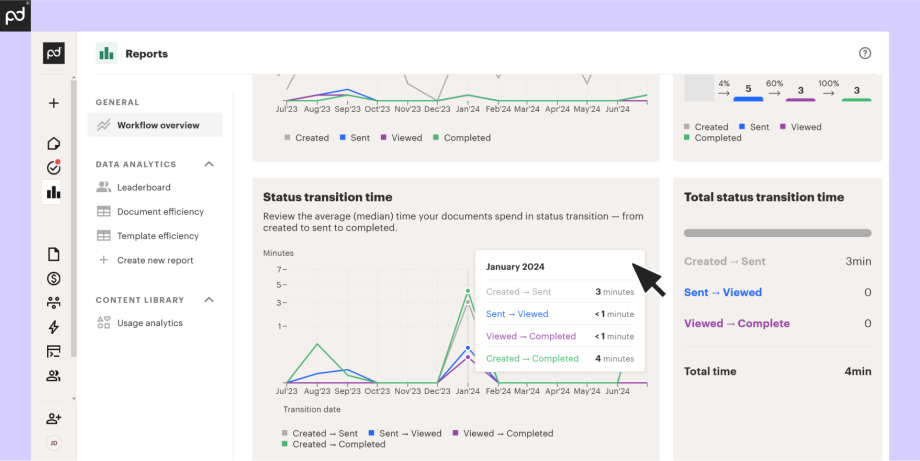
Detailed Comparison Table:
| Feature | Document Automation (PandaDoc) | Traditional DMS | Why It Matters |
|---|---|---|---|
| Core Purpose | Dynamic generation + lifecycle | Storage & organization | Automation starts processes; DMS ends them |
| Data Handling | Real-time CRM/form integrations | Manual uploads/scans | No copy errors; always current |
| Intelligence | Rules, AI, conditionals | Keyword search/OCR | Adaptive content vs. basic retrieval |
| Workflows | Approvals, eSign, tracking | Version history/share | End-to-end vs. post-creation |
| Scalability | Infinite personalization/volume | File limits/costs | Grows with business; no bottlenecks |
| Cost Structure | Per-use/user (efficient) | Per-storage GB | Pay for action, not space |
| Use Case Fit | Proposals/contracts creation | Archives/backups | Complementary: Automate → Manage |
Best Practice: Feed PandaDoc outputs into DMS for hybrid power. Prevents mismatched buys, clarifies value.
9. Is Document Automation Suitable for Small and Growing Businesses?
Absolutely SMBs benefit most, with 4x faster ROI than enterprises (IDC 2025). PandaDoc’s affordable plans ($19/user/mo) make it accessible.
Comprehensive Objection Handling:
| Common Objection | PandaDoc Reality | Quantified Benefit | Example |
|---|---|---|---|
| Too Complex for Non-Tech | Intuitive drag-drop; video tutorials | 2-4hr setup | Marketer builds proposals sans code |
| Not Enough Volume | Free trial; pay-per-doc options | Handles 5-500 docs/mo | Freelancer automates client scopes |
| Expensive Upfront | Starts $19/mo; scales | 3x ROI Month 1 ($2K saved) | Team cuts 10hrs/wk admin |
| Integration Hassles | 30+ natives + Zapier | WordPress/CRM sync | Forms → PandaDoc → auto-sign |
| Overkill for Small Ops | Tiered features | Grows with you | Startup to 50 users seamless |
Success Story: Digital agency automates from 10 to 100 proposals/mo 35% more clients, no extra staff. Tailored for growth phases.
10. Limitations of Document Automation Tools
Transparency fosters credibility even top tools like PandaDoc aren’t perfect. Here’s a candid look, with workarounds.
Key Limitations Detailed:
- Sophisticated Logic Gaps 🛠️: Basic if/then fine; intricate ML/branching often requires Zapier or custom code (e.g., PHP for WordPress).
- Ecosystem Incompleteness: 90% apps integrate; obscure CRMs need API tweaks.
- Garbage In, Garbage Out: Relies on clean data dirty CRM = flawed docs (80% issues here).
- Initial Ramp-Up: Templates easy; workflows take 4-8hrs practice.
- Tiered Pricing: Free/basic great; unlimited/AI ~$50/user/mo scales up.
- Bespoke Boundaries: Ultra-custom UIs? Platform extensions limited.
| Limit | PandaDoc Impact | Workaround |
|---|---|---|
| Logic | Mid-complex ok | Zapier/dev |
| Data | Input critical | Clean CRM first |
| Cost | Usage-based | Start small |
Trials reveal fit; evolve with 2026 updates. Trust via honesty. ⚖️
11. How Document Automation Fits Into a Modern Business Workflow
PandaDoc slots perfectly as the central hub, orchestrating with your stack for end-to-end efficiency.
Visual Workflow Diagram:
[Website Forms/WordPress] → [CRM: HubSpot/Salesforce] → [PandaDoc: Generate + Customize] → [Approvals: Email/Slack] → [eSign] → [Storage: Drive/SharePoint] → [Analytics/ERP]
Detailed Ecosystem Integration:
- Input Layer (CRM/Forms): Pulls leads/data automatically; WordPress plugins feed PandaDoc directly.
- Creation Core: Templates + logic produce docs; AI refines.
- Approval Pipelines: Configurable steps (e.g., sales → legal); real-time notifications.
- Signature & Execution: PandaDoc’s built-in eSign; compliant, mobile.
- Output & Insights: Archives to cloud; dashboard metrics feed BI/optimizations.
- Dev Customization: APIs/webhooks for PHP/JS—extend with SQL queries or Cloudflare security.
Example Chain: Lead form → PandaDoc proposal → approve/track → sign → invoice auto-trigger. Ties everything frictionlessly. 🔗
12. Conclusion: Why Document Automation Is Becoming a Business Standard?
Document automation has evolved from niche to necessity, with platforms like PandaDoc leading the charge. It delivers 85-95% efficiency gains, ironclad compliance, and limitless scalability transforming paperwork into a growth engine.
Quick Wins Recap:
- Pain to Power: Manual chaos → automated precision.
- Team Impact: Sales closes faster, HR scales hires, legal risks zero.
- Data Edge: Analytics optimize like never before.
2025 stats (Gartner/IDC): 50% adoption surge; 90% enterprises by 2027. Future-proof with AI predictions, blockchain verifies, zero-touch ecosystems.
Start small audit one workflow. The standard is here; thrive within it. 🌟
Related Article:
Streamlining SLA Management with PandaDoc & ShipChain
ShipChain SCM + PandaDoc Integration for Contract Automation
FAQs
1. What’s the quickest way to start document automation?
Use PandaDoc’s free trial upload a template, connect your CRM, and test a proposal in 30 minutes. No coding needed. 🚀
2. Does PandaDoc work with WordPress forms?
Yes via Zapier or APIs; form submits auto-generate docs. Perfect for lead nurturing. 🔗
3. How much time does it really save?
85-95% on creation; teams reclaim 15+ hours/week for high-value tasks (IDC 2025). ⏱️
4. Is it secure for contracts?
Fully ESIGN-compliant eSign, audit trails, encryption. Tamper-proof logs. 🛡️
5. Good for small teams?
Ideal $19/mo entry, scales seamlessly without IT overhead. SMB ROI in weeks. 📈

Hi, I’m Nelson 👋 a content writer and reviewer with 6+ years of experience writing blogs, coupon guides, and detailed website reviews. I have a strong background in continuous learning and research, which helps me analyze platforms, tools, and websites in a structured and practical way 📚.
My content is based on real research, hands-on analysis, and accuracy, with a clear focus on simplicity, transparency, and user-first value. I aim to break down complex information into content that’s easy to understand and genuinely helpful for readers ✅.