In today’s fast-paced digital world, businesses need efficient tools to create, manage, and sign documents quickly.
Enter PandaDoc a comprehensive document management and electronic signature platform that’s revolutionizing how organizations handle their paperwork.
Whether you’re sending proposals, contracts, quotes, or agreements, PandaDoc streamlines the entire document workflow from creation to signature to payment collection.
This complete guide will walk you through everything you need to know about PandaDoc, including its features, pricing, benefits, and how it can transform your business operations.
What is PandaDoc? 🤔
PandaDoc is an all-in-one document automation platform that enables businesses to create, approve, track, and electronically sign documents up to 40% faster than traditional methods.
Founded with the mission to simplify document workflows, PandaDoc combines document creation, electronic signatures, contract management, and workflow automation into a single, user-friendly platform.
Unlike basic e-signature tools that only handle signing, PandaDoc offers a complete ecosystem for managing every aspect of your business documents.
From sales proposals and contracts to quotes and invoices, the platform helps teams across various departments work more efficiently and close deals faster.
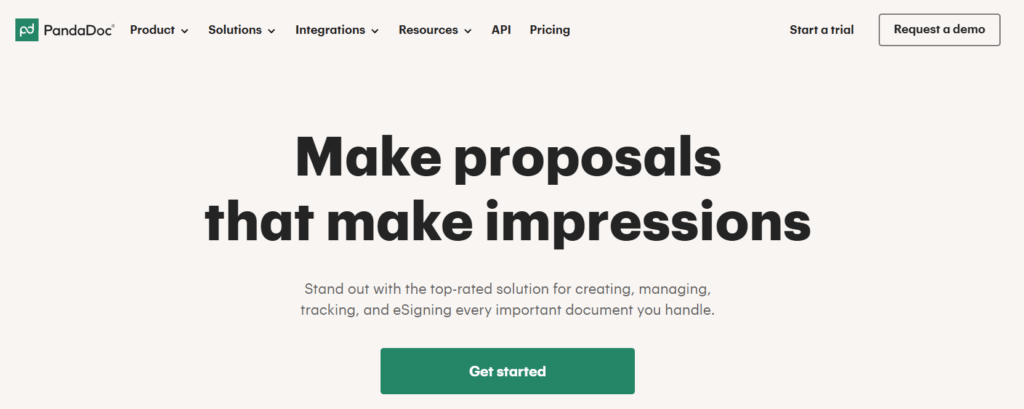
Key Capabilities at a Glance ✨
- Document Creation: Build professional documents using drag-and-drop editors
- Electronic Signatures: Collect legally binding e-signatures from anywhere
- Contract Management: Organize and store all your agreements in one place
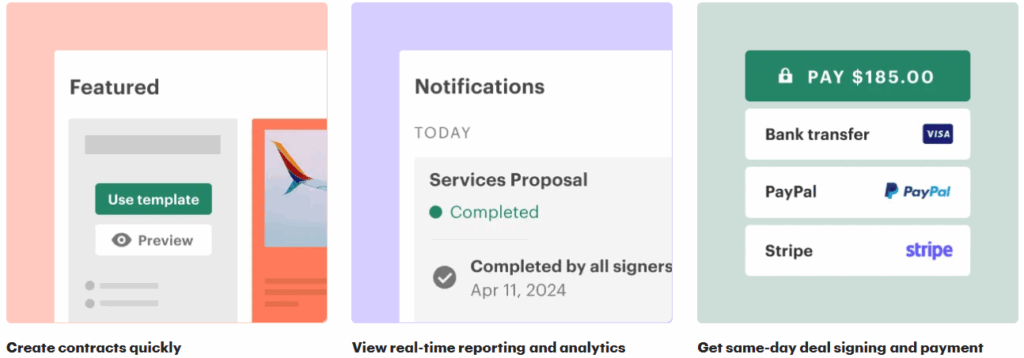
- Payment Collection: Accept payments directly through documents
- Analytics & Tracking: Monitor document engagement in real-time
- Workflow Automation: Streamline repetitive tasks and approvals
- CRM Integrations: Connect with popular platforms like Salesforce and HubSpot
⭐ Core Features of PandaDoc
PandaDoc is packed with features that make document creation, management, and signing easier than ever. Let’s dive into the key features that make it stand out in the world of document automation and help businesses boost their productivity.
1. 📄 Document Creation & Editor
One of PandaDoc’s core strengths is its intuitive document editor. This drag-and-drop tool makes it easy for users to create professional documents without any design or coding skills.
- Pre-built Templates: You can choose from a wide variety of customizable templates for proposals, contracts, quotes, and other business documents.
- Content Blocks: Text, images, tables, terms & conditions, and other content blocks can be inserted directly into your document.
- Branding: Ensure consistency across your documents with branded templates that match your company’s visual identity.
With PandaDoc’s editor, you can save countless hours on document creation, making it easy to produce professional documents in just a few minutes. 📈
2. ✍️ eSignatures & Digital Signatures
Gone are the days of printing, signing, and scanning documents. With PandaDoc’s eSignatures, you can sign documents legally and securely online.
- Legally Binding: PandaDoc’s eSignatures are compliant with ESIGN Act, UETA, and GDPR.
- Sign Anywhere: Whether you’re on desktop, tablet, or mobile, signing documents is as simple as a click.
- Multi-step Signing: PandaDoc allows you to customize the signing order, making it easy to manage document workflows with multiple signatories.
eSignatures aren’t just a time-saver; they also improve the security and traceability of the signing process, ensuring all steps are logged for future reference. 🔐
3. 🤖 Workflow Automation
Automating repetitive document tasks is one of PandaDoc’s standout features. With workflow automation, businesses can eliminate the hassle of manual document handling.
- Automatic Creation: Use data from CRM tools like Salesforce or HubSpot to automatically generate proposals, quotes, and contracts with pre-populated fields.
- Document Tracking: PandaDoc automatically tracks who views your documents, how long they spent on each page, and whether they’ve signed or made changes.
- Approval Workflows: Set up sequential approvals for documents, so you never have to chase down approvals manually again.
This automation feature helps eliminate human errors and ensures documents are completed faster and with greater accuracy. ⏱
4. 🔗 Integrations with Other Tools
PandaDoc doesn’t work in isolation it integrates seamlessly with other business tools that your team already uses. Here are a few examples:
- CRM Tools: Integrate PandaDoc with CRMs like Salesforce, HubSpot, and Pipedrive to automatically pull data and send personalized documents to leads or clients.
- Cloud Storage: Store and access your documents easily by syncing PandaDoc with Google Drive, Dropbox, and other cloud storage platforms.
- Accounting & Billing: Integrate with tools like QuickBooks or Stripe to manage payments directly within your documents.
These integrations help streamline your sales, finance, and marketing workflows, ensuring everything stays in sync across platforms. 🌐
5. 🧠 Analytics & Real-Time Tracking
PandaDoc provides real-time analytics that allow you to track the progress of your documents as they move through your sales cycle.
- Document Tracking: See when a document was opened, for how long, and which sections were viewed the most.
- Engagement Analytics: Track which recipients interacted with your documents and when they signed, helping you follow up at the right time.
- Team Insights: Monitor team performance, document completion rates, and deal progress to identify bottlenecks.
These analytics not only provide valuable insights into client engagement but also help businesses improve their document strategy and sales funnel. 📊
🔒 PandaDoc’s Role in Online Privacy Protection
PandaDoc ensures your business’s document security and privacy compliance by offering robust features designed to protect sensitive data throughout its lifecycle.
1. 🔐 Document Security
- Encryption: PandaDoc uses 256-bit AES encryption to secure documents both in transit and at rest.
- Secure Storage: Documents are stored in secure data centers.
- Role-Based Access Control: Limit access to sensitive data with custom permissions.
These features ensure that your documents are safe from unauthorized access and data breaches.
2. 📝 Compliance with Privacy Regulations
PandaDoc is compliant with various regulations, including:
- GDPR for European data protection
- ESIGN Act & UETA for legal digital signatures
- HIPAA for healthcare document management
This helps businesses stay compliant while managing documents digitally.
3. 🧑💻 User Authentication & Access Control
- Two-Factor Authentication (2FA) for enhanced security.
- Single Sign-On (SSO) for easy, secure login.
- Access Expiration & Permissions to control document visibility.
These tools help control who can access and sign documents, ensuring only authorized users have access.
4. 🛡️ Audit Trails & Document Tracking
PandaDoc automatically generates a complete audit trail of document actions, showing:
- Timestamped steps (viewing, signing, etc.)
- User actions (who did what)
This provides a transparent record of the document’s journey for compliance and legal purposes.
5. 🛡️ Secure Sharing & Data Minimization
- Password Protection to restrict access.
- Watermarking to prevent unauthorized sharing.
- Data Minimization by only storing necessary information.
These features help protect sensitive information when sharing documents and ensure privacy by minimizing data storage.
PandaDoc helps businesses protect their sensitive documents by combining security, compliance, and workflow automation in one platform.
Whether you’re handling contracts, proposals, or HR documents, PandaDoc ensures your workflows are secure, efficient, and compliant. 🌐
Security & Compliance 🔒
PandaDoc takes security seriously with enterprise-grade protection:
🔹Certifications & Compliance
- SOC 2 Type II Certified
- HIPAA Compliant: Suitable for healthcare organizations
- GDPR Compliant: Meets European data protection standards
- eIDAS Compliant: Supports EU electronic signature regulations
- E-SIGN & UETA: Complies with US electronic signature laws
- FERPA Compliant: Safe for educational institutions
- 21 CFR Part 11: Meets FDA requirements
🔹Security Features
- 256-bit SSL Encryption: Protects data in transit
- AWS Infrastructure: Hosted on secure Amazon Web Services
- Two-Factor Authentication (2FA): Additional account protection
- Role-Based Permissions: Control who can access what
- Digital Signature Certificates: Verify document authenticity
- Audit Trails: Complete record of all document activities
- Data Backup: Regular automated backups

Incorporating PandaDoc into your workflows helps ensure compliance with essential regulations like GDPR. For more detailed information on GDPR and its implications, check out this guide on GDPR compliance. 📜
Benefits of Using PandaDoc ✅
1. Time Savings ⏰
Companies using PandaDoc can create, approve, track, and eSign documents up to 40% faster than traditional methods. TheKey company reportedly saves 3,000 hours per year using the platform.
2. Cost Reduction 💰
By eliminating printing, scanning, and mailing costs, businesses save significantly. Nomad cut customer acquisition costs by 20% after implementing PandaDoc.
3. Improved Accuracy ✔️
Automated data pulling from CRMs and smart content features reduce human errors in documents and quotes.
4. Better Customer Experience 😊
Professional-looking documents with embedded payments and easy signing processes create a smoother experience for clients.
5. Increased Close Rates 📊
Real-time tracking and faster document turnaround help sales teams close deals more efficiently. ChiliPiper increased their close rate by 28% using PandaDoc.
6. Enhanced Collaboration 🤝
Teams can work together in real-time, reducing back-and-forth emails and version control issues.
7. Mobility 📱
Mobile apps for iOS and Android allow document management from anywhere, enabling remote work.
8. Compliance & Legal Protection 🛡️
Legally binding signatures with complete audit trails protect businesses and ensure regulatory compliance.
Tips for Maximizing PandaDoc 💡
- Create a Template Library: Build templates for all common document types to save time
- Use Smart Content: Leverage conditional logic to create dynamic documents
- Set Up Automations: Configure workflows to reduce manual tasks
- Integrate Your CRM: Pull data automatically to avoid duplicate entry
- Enable Reminders: Set automatic follow-ups for unsigned documents
- Customize Branding: Maintain brand consistency across all documents
- Track Analytics: Review engagement metrics to optimize your documents
- Train Your Team: Ensure all users understand best practices
- Utilize Workspaces: Organize teams and content for better management
- Leverage API: For advanced needs, use API integrations for custom workflows
“PandaDoc is the ultimate tool for document automation. To help you get started with a premium plan, you can grab an exclusive PandaDoc discount and save on your first year of automated document management.”
PandaDoc vs Competitors ⚔️
🔹PandaDoc vs DocuSign
While DocuSign focuses primarily on eSignatures, PandaDoc brings the entire document workflow into one platform including proposal creation, contract management, and payment collection. PandaDoc also offers unlimited documents without envelope limits, whereas DocuSign caps sends at 100 envelopes per year on most plans.
🔹PandaDoc vs Adobe Sign
PandaDoc offers more comprehensive document creation tools and better CRM integrations compared to Adobe Sign’s focus on PDF workflows.
🔹PandaDoc vs Proposify
PandaDoc provides broader functionality beyond proposals, including contracts, quotes, and payment processing, while Proposify specializes mainly in proposal creation.
🔹PandaDoc vs Dropbox Sign (HelloSign)
PandaDoc includes advanced features like CPQ, deal rooms, and extensive automation that Dropbox Sign doesn’t offer.
Common Use Cases 📋
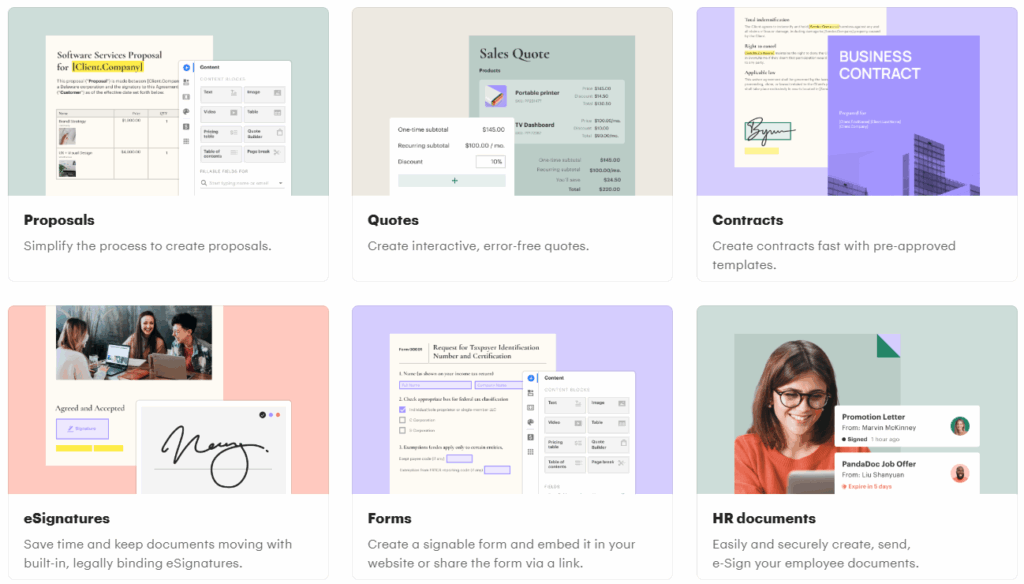
1. Sales Proposals
Create compelling proposals with pricing tables, images, and videos to win more deals.
2. Service Agreements
Generate and manage contracts for ongoing services with clear terms and conditions.
3. Employment Contracts
Streamline hiring with offer letters, employment agreements, and onboarding documents.
4. NDAs (Non-Disclosure Agreements)
Protect confidential information with quickly generated, legally binding NDAs.
5. Quotes & Estimates
Provide accurate pricing to customers with professional quotes and estimates.
6. Invoices
Create invoices with embedded payment options for faster collections.
7. Leases & Rental Agreements
Process property agreements efficiently with tenant signatures.
8. Purchase Orders
Formalize procurement with structured purchase order documents.
Conclusion 🎉
PandaDoc is a powerful, comprehensive document management and eSignature solution that streamlines workflows for businesses of all sizes. From creating professional proposals to collecting legally binding signatures and accepting payments, the platform handles the entire document lifecycle in one unified system.
With its user-friendly interface, extensive integrations, robust security, and flexible pricing, PandaDoc stands out as a top choice for organizations looking to modernize their document processes. Whether you’re a small business sending a few agreements per month or a large enterprise managing complex sales workflows, PandaDoc offers the tools and scalability to meet your needs.
The platform’s strong track record of helping companies save time, reduce costs, and close more deals makes it a worthwhile investment for any business serious about improving efficiency and customer experience.
Ready to transform your document workflow? Start with PandaDoc’s free plan or 14-day trial today and experience the difference that modern document management can make! 🚀
“RELATED ARTICLES”:
- What Is Document Automation and Why Businesses Use PandaDoc
- How to Manage Signed Documents and Audit Trails in PandaDoc
Frequently Asked Questions (FAQs) ❓
1. Is PandaDoc legally binding?
Yes, documents signed through PandaDoc are legally binding and comply with E-SIGN Act, UETA, and eIDAS regulations.
2. Does PandaDoc work on mobile devices?
Yes, PandaDoc offers native mobile apps for both iOS and Android, allowing full document management on the go.
3. Can I try PandaDoc before purchasing?
Yes, PandaDoc offers a free eSign plan and a 14-day free trial of paid plans with no credit card required.
4. How many documents can I send?
All paid plans include unlimited document sends and signatures. The free plan is limited to 5 documents per month.
5. Does PandaDoc integrate with my CRM?
PandaDoc integrates with major CRM platforms including Salesforce, HubSpot, Pipedrive, Zoho, and more.

Hi, I’m Nelson 👋 a content writer and reviewer with 6+ years of experience writing blogs, coupon guides, and detailed website reviews. I have a strong background in continuous learning and research, which helps me analyze platforms, tools, and websites in a structured and practical way 📚.
My content is based on real research, hands-on analysis, and accuracy, with a clear focus on simplicity, transparency, and user-first value. I aim to break down complex information into content that’s easy to understand and genuinely helpful for readers ✅.