In today’s fast-paced digital world, the need for efficient and secure document management has never been greater. Whether you’re a startup, an enterprise, or an individual looking to streamline your document processes, choosing the right e-signature solution is crucial. 🖋️
But here’s the burning question: PandaDoc and DocuSign? 🤔
Both platforms are top-tier solutions for creating, signing, and managing documents electronically, but they come with their own set of features, pricing, and integrations. But which one offers the best value for your specific needs?
Let’s break it down and help you make an informed decision! 💡
Quick Snapshot: PandaDoc vs DocuSign
When it comes to choosing the right e-signature tool, it’s essential to make a quick but informed decision. Here’s a side-by-side comparison of PandaDoc and DocuSign at a glance:
| Feature | 🐼 PandaDoc | 📄 DocuSign |
|---|---|---|
| Core Identity | The All-in-One Deal Accelerator | The E-Signature Legend |
| Best For | Sales & Revenue Teams Creating, sending, tracking proposals & quotes. |
Legal, HR, Finance & General Use Secure, compliant signatures for any document. |
| Pricing Vibe | “Value Bundle” More features in mid-tier plans. |
“À La Carte” Core signatures are affordable; advanced features cost extra. |
| Free Plan | ✅ Yes! Generous free eSign plan. | ✅ Yes, but limited. 3 documents/month. |
| Secret Sauce | Native Payment Collection (Get paid inside your proposal) |
Global Trust & Compliance The name everyone knows and trusts. |
| Key Weakness | Can feel “heavy” if you only need signatures. | Document creation is basic; workflow feels “bolted on.” |
| Our Short Verdict | Choose if: Your process starts with creating a document, not just signing one. | Choose if: “Get it signed ASAP” is your #1 and only goal. |
See the gap? 🤯 PandaDoc is a journey (Create → Send → Track → Sign → Get Paid). DocuSign is a destination (Upload → Sign → Done).
But wait, the devil is in the details. What does “all-in-one” or “global trust” actually mean for your daily work? Let’s peel the next layer.
Key Feature Comparison
Workflow & Automation 🤖
🐼 PandaDoc = Your Automated Deal Conveyor Belt.
- Sets up entire journeys: Draft → Internal Approval → Send → Notify CRM → Track → Sign → Collect Payment → Notify Accounting. 🔄
- CRM (Salesforce, HubSpot) is its brain. Creates docs from CRM data, auto-logs activity.
📄 DocuSign = A Very Efficient Signing Kiosk.
- Focuses only on the signing step. “Who signs, in what order?” That’s its core automation.
- Complex workflows need separate apps + Zapier, making it clunky.
Bottom Line: Need a process? PandaDoc. Need just a signature? DocuSign.
E-Signature & Compliance ✍️
📄 DocuSign: The Gold Standard.
- #1 in trust & legality. Global acceptance, strongest audit trail.
- Advanced features: In-person signing, biometric verification, notary.
- Compliance King: HIPAA, 21 CFR Part 11, EU Advanced Signatures.
🐼 PandaDoc: The Smart, Integrated Signer.
- Legally binding & fully compliant for most businesses (SOC 2, GDPR).
- Seamless experience inside the document journey. No context switching.
- Lacks some advanced compliance suites of DocuSign.
Bottom Line: Legal/HR/Pharma? DocuSign. General biz/sales? PandaDoc is perfectly solid.
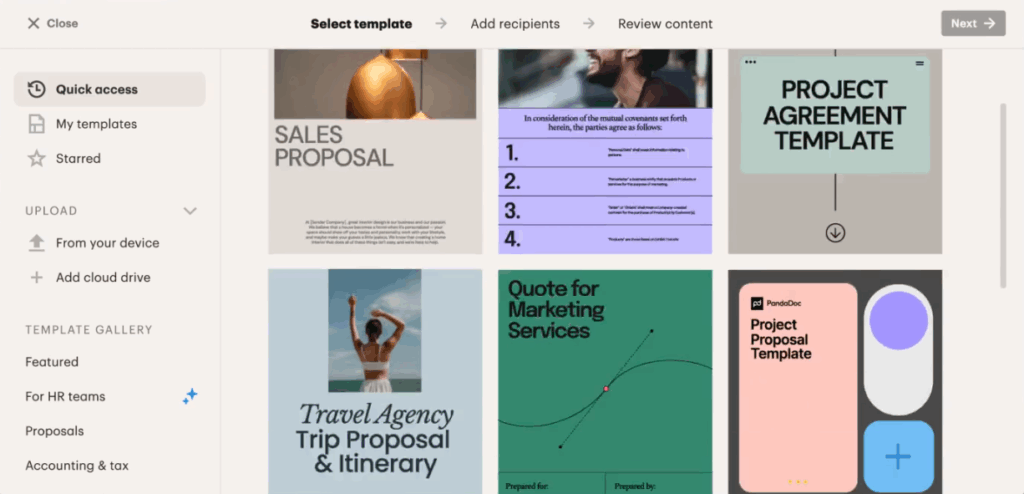
Document Management & Tracking 📈
🐼 PandaDoc: The Deal Intelligence Hub.
- Live alerts: Know when a prospect opens, scrolls, or spends time on a section. 🎯
- Revenue analytics: Track proposal performance, win rates, cycle time.
- Actionable insights: See what content wins deals.
📄 DocuSign: Basic Receipt System.
- Tells you “when” it was signed. Period.
- No engagement data pre-signature.
Bottom Line: Need to understand & influence the signer? PandaDoc. Just need a “proof of signature”? DocuSign.
Integrations & Ecosystem 🔌
🔗 DocuSign: The Universal Plug.
- Massive marketplace. Connects to everything (Salesforce, SAP, Oracle, Google, MS).
- Depth in enterprise systems and legacy software.
- Often acts as the dedicated e-sign layer in a complex tech stack.
🐼 PandaDoc: The Native CRM Soulmate.
- Deep, native 2-way sync with Salesforce, HubSpot, Pipedrive.
- Data flows automatically → doc creation → activity logging.
- Best for modern revenue stacks. Less breadth, more depth in sales tools.
Bottom Line: Complex, multi-department IT landscape? DocuSign. CRM-centric sales team? PandaDoc’s integration is magic.
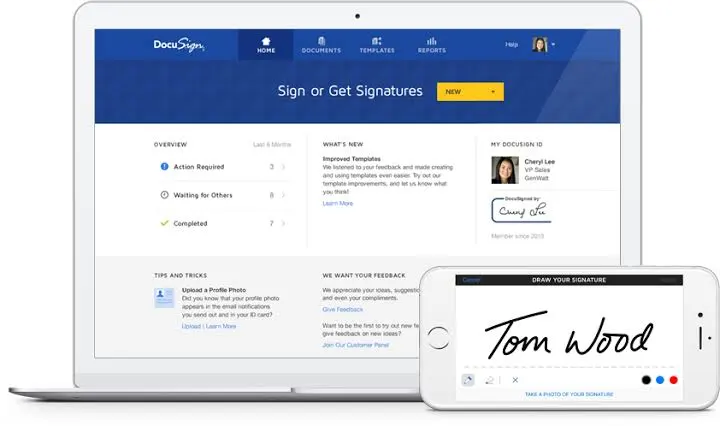
Document Creation & Templates 🎨
📄 DocuSign: The Efficient Signing Canvas
- Upload & Tag System: You bring the finished document (PDF/Word), simply tag where to sign/date.
- Basic Field Templates: Save field placements for recurring docs like contracts.
- No Design Tools: Zero drag-and-drop content creation. It’s a signing layer, not a design studio.
🐼 PandaDoc: The All-in-One Design Studio
- Visual Drag & Drop Editor: Build beautiful docs like a webpage. Add videos, pricing tables, live payment buttons.
- Dynamic Content Library: Save & reuse sections (case studies, terms). Insert with one click.
- Smart Brand Control: Lock logos, fonts, colors company-wide. Ensures 100% brand compliance.
Bottom Line: Need to create persuasive, branded documents from scratch? PandaDoc wins. Just need to tag and send final drafts? DocuSign is enough.
Security & Compliance – The Trust Factor 🔐
🔒 DocuSign: The Fort Knox of E-Signatures
- Global Legal Enforceability: Industry’s strongest audit trail & proof in court.
- Advanced Compliance Suites: HIPAA, 21 CFR Part 11 (life sciences), EU Advanced eIDAS signatures.
- Enterprise-Grade: ISO 27001, SOC 2 Type II, data residency options worldwide.
🛡️ PandaDoc: The Robust Business Shield
- Legally Binding & Secure: SOC 2 Type II, GDPR, ISO 27001 certified. Fully court-admissible.
- Sales-Focused Security: Role-based access, document encryption, audit logs.
- Gap: Lacks DocuSign’s specialized compliance packages for highly regulated sectors.
Bottom Line: Legal, Pharma, Global Enterprise? DocuSign’s compliance is non-negotiable. General Business, Sales, Marketing? PandaDoc’s security is more than sufficient.
PandaDoc vs DocuSign: Pricing Breakdown 💸
Both PandaDoc and DocuSign offer multiple pricing tiers, but the cost structure and value for money can differ significantly. Let’s compare their plans to see which one fits your needs and budget.
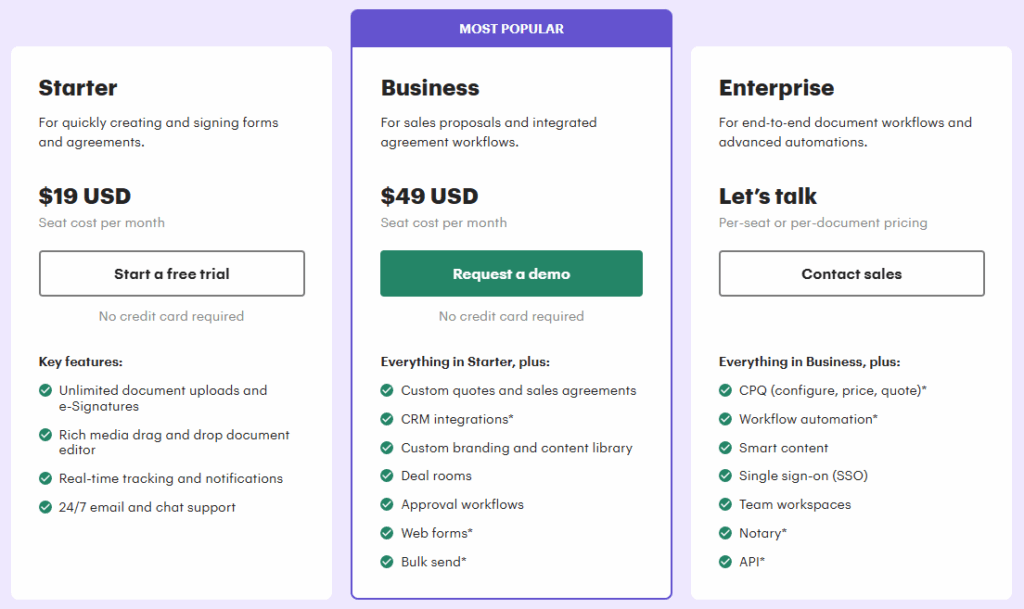
PandaDoc Pricing 📄
Free Plan: $0/month (unlimited seats) – For small businesses needing basic e-signatures.
Starter Plan: $19/month per user – Ideal for creating and signing forms quickly.
Business Plan: $49/month per user – Perfect for sales proposals and integrated workflows.
Enterprise: Custom pricing – For advanced features and automations.
DocuSign Pricing ✍️
Personal Plan: £8/month – Basic e-signature needs (for individuals).
Standard Plan: £20/month per user – For small to medium teams that need to send, sign, and collaborate.
Business Pro Plan: £33/month per user – For automating and optimizing agreements.
Enterprise Plan: Custom pricing – For large organizations with advanced features.
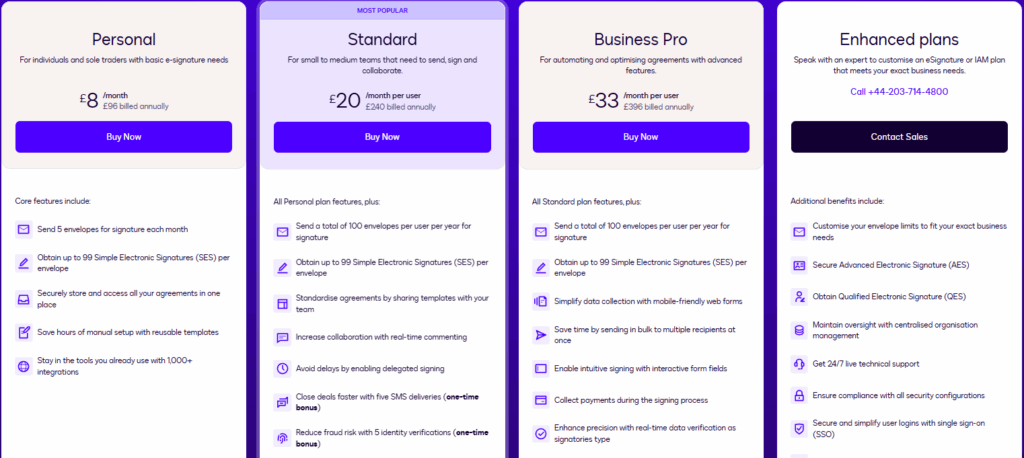
Key Takeaways:
📌 PandaDoc offers more flexibility with a free plan and additional features like workflow automation at a competitive price.
📌 DocuSign is often the choice for businesses prioritizing compliance and security, but may cost more for similar features.
If PandaDoc fits your needs better, consider checking for any available PandaDoc coupon or limited-time discount before signing up.
Pros & Cons: A Quick Comparison
To help you make the final call, let’s look at the pros and cons of each platform. This will give you a better idea of which e-signature tool fits your needs best.
🐼 PandaDoc: Pros & Cons
PandaDoc Pros
- ✓ All-in-One: Create, send, track, sign, and collect payment in one flow.
- ✓ CRM Integrations: Auto-populate docs with data from Salesforce/HubSpot.
- ✓ Transparent Value: The Business plan offers key features without surprises.
- ✓ Engagement Analytics: Track document interactions beyond just signings.
- ✓ Great Free Plan: A usable free tier for basic e-signatures.
PandaDoc Cons
- ✕ Can Feel Heavy: Overkill for simple e-signature needs.
- ✕ Learning Curve: Requires onboarding for teams who just want signatures.
- ✕ Not the Best for Compliance: Lacks DocuSign’s certifications for regulated industries.
📄 DocuSign: Pros & Cons
DocuSign Pros
- ✓ Unmatched Trust: “DocuSign” carries instant credibility globally with clients and courts.
- ✓ Simplicity for Signing: Quick and intuitive signing process for final documents.
- ✓ Enterprise Compliance: Trusted for regulated industries (HIPAA, eIDAS, etc.).
- ✓ Vast Integrations: Connects seamlessly to both legacy and modern systems.
DocuSign Cons
- ✕ Expensive “À La Carte” Pricing: Basic plans are limited; add-ons can double the cost.
- ✕ Basic Document Creation: Lacks design tools, limiting branding and personalization.
- ✕ Weak Pre-Signature Insights: No data on how recipients engage with the document before signing.
Audit trails and document tracking are critical when comparing e-signature tools. For a deeper look at how PandaDoc handles signed document management, see our detailed Audit Trails Guide.
User Experience & Support: Which One is Easier to Use?
When it comes to selecting an e-signature solution, the user experience and support quality can make or break your decision. Let’s take a closer look at how PandaDoc and DocuSign compare in these areas.
1. Ease of Use 🖥️
- PandaDoc:
PandaDoc offers a clean, intuitive interface with drag-and-drop document creation and customization. Its user-friendly design allows even non-technical users to create professional documents and send them for signatures quickly. Plus, the integration of workflow automation helps save time on repetitive tasks. - DocuSign:
While DocuSign is reliable and secure, its interface can feel a bit more corporate and less intuitive compared to PandaDoc. Users often find it more focused on signing workflows rather than document creation, which might make it feel less flexible for teams looking for more robust customization.
2. Customer Support 💬
- PandaDoc:
PandaDoc provides 24/7 customer support via live chat and email. It also offers an extensive help center, with tutorials, FAQs, and a community forum for users to get quick answers. Additionally, PandaDoc has account managers available for enterprise customers to provide more personalized assistance. - DocuSign:
DocuSign also offers 24/7 support, but it mainly focuses on email and phone assistance. The support system is reliable, but DocuSign’s help center is not as comprehensive as PandaDoc’s, with fewer self-service resources. For enterprise customers, dedicated support options are available, but there may be additional costs for premium support.
Security & Compliance: Which One Offers More Protection?
When dealing with sensitive documents, security and compliance are non-negotiable. Let’s take a deep dive into the security features and compliance standards that PandaDoc and DocuSign offer to ensure your documents are legally binding and protected.
1. PandaDoc Security 🛡️
PandaDoc provides a robust set of security features, making it a secure choice for businesses in various industries. Some of the key security features include:
- SOC 2 Type II Compliance
- HIPAA Compliance (for healthcare-related documents)
- GDPR Compliance (for businesses in the EU)
- SSL Encryption for document transmission
- Two-Factor Authentication (2FA)
PandaDoc ensures your data is protected with 256-bit encryption during both document creation and e-signing, making it a safe platform for sensitive contracts.
2. DocuSign Security 🔑
DocuSign is a well-established leader in digital signature security. It offers top-tier security measures, including:
- SOC 2 Type II Compliance
- HIPAA Compliance
- GDPR Compliance
- ESIGN Act Compliance (for legally binding signatures in the U.S.)
- AES-256 Encryption
- Two-Factor Authentication (2FA)
DocuSign has legal enforceability and advanced compliance features that meet the most stringent industry standards, making it a top choice for businesses in highly regulated sectors like banking, insurance, and healthcare.
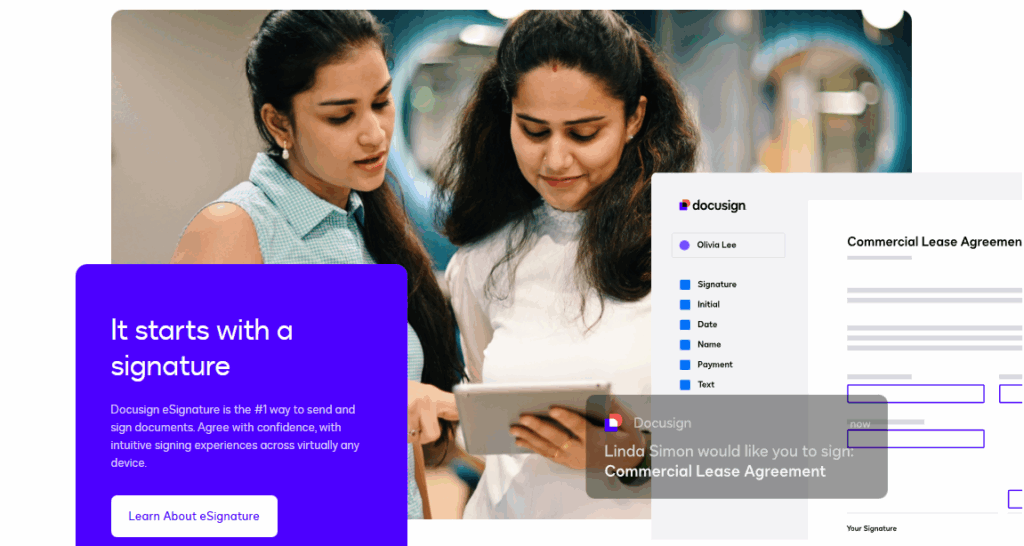
“Both PandaDoc and DocuSign offer top-tier security and compliance features. E-signatures are legally binding under U.S. law due to ESIGN and UETA regulations. For more details on how e-signatures hold legal weight, check out this guide on the legality of e-signatures.
Who Should Pick Which? – PandaDoc vs DocuSign 🏆
A quick guide to help you choose: PandaDoc is best for small to mid‑sized teams needing comprehensive document workflows, while DocuSign is ideal for large organizations and regulated industries that prioritize top‑tier security and compliance.
Who Should Choose PandaDoc?
- Small to Mid-Sized Businesses 💼: PandaDoc is perfect for businesses that need a cost-effective solution for managing documents, collecting signatures, and automating workflows. Its flexibility, combined with affordable pricing, makes it a strong choice for growing teams.
- Sales Teams 📊: If your team frequently works with contracts, proposals, and quotes, PandaDoc’s integration with CRMs like Salesforce and HubSpot allows for smooth document creation and automated workflows.
- Marketing & HR 📋: Whether it’s customizable contracts, employee onboarding, or client proposals, PandaDoc allows you to easily create, send, and sign documents, while saving time with templates and automation.

Who Should Choose DocuSign?
- Large Enterprises 🏢: DocuSign excels in enterprise-level document management. If you need to handle high-volume document signing in a large-scale organization, DocuSign’s advanced features and security are ideal.
- Highly Regulated Industries ⚖️: If your business operates in sectors like healthcare, banking, or legal, DocuSign’s compliance features, such as SOC 2, HIPAA, and ESIGN Act, make it the go-to solution for highly secure, legally binding signatures.
- Businesses with Complex Needs 🔑: If your business requires custom integrations with enterprise tools like Salesforce, SAP, and Oracle, DocuSign offers a more comprehensive set of integrations.
“E‑signatures are legally recognized in the U.S. under the ESIGN Act and UETA, while in the EU, the eIDAS regulation governs their validity. For a detailed look at how these laws support the global enforceability of e‑signatures, check out this overview of international e‑signature compliance.
Conclusion

In the battle of PandaDoc vs DocuSign, the right choice depends on your business needs:
- PandaDoc is the winner if you’re a small to mid-sized business or sales team looking for affordable pricing, document creation, and workflow automation.
- DocuSign shines in industries that require strict compliance, security, and enterprise-level solutions making it ideal for larger organizations and highly regulated industries like healthcare and finance.
No matter your choice, both platforms offer top-tier document management it all comes down to your priorities: whether it’s features, pricing, or security.
“RELATED ARTICLES”
- 5+ Best PandaDoc Alternatives & Competitors
- What is PandaDoc? A Complete Guide to Document Automation
❓ Frequently Asked Questions
1. Which is better for small businesses, PandaDoc or DocuSign?
PandaDoc is better for small businesses due to its affordable pricing, templates, and workflow automation.
2. Is DocuSign more secure than PandaDoc?
Both are secure, but DocuSign is preferred for enterprise-level security and compliance in regulated industries.
3. Can I integrate PandaDoc with other software like Salesforce or HubSpot?
Yes! PandaDoc integrates with popular tools like Salesforce, HubSpot, and Google Workspace.
4. Does DocuSign offer a free plan?
DocuSign does not offer a free plan, but it has a Personal plan starting at $10/month.
5. Can I collect payments through PandaDoc?
Yes! PandaDoc allows payments through integrations like Stripe and PayPal.

Hi, I’m Nelson 👋 a content writer and reviewer with 6+ years of experience writing blogs, coupon guides, and detailed website reviews. I have a strong background in continuous learning and research, which helps me analyze platforms, tools, and websites in a structured and practical way 📚.
My content is based on real research, hands-on analysis, and accuracy, with a clear focus on simplicity, transparency, and user-first value. I aim to break down complex information into content that’s easy to understand and genuinely helpful for readers ✅.