Sales teams know the drill all too well: 🕒 crafting proposals that take hours (or days), chasing approvals across email threads, and playing phone tag for signatures.
Manual documents slow everything down deals drag, reps waste time on admin, and that hot lead goes cold before you can say “follow-up.” Without smart automation, your sales workflow turns into a bottleneck that kills velocity. 😩
Enter PandaDoc for sales teams the document workflow tool that streamlines proposals, tracking, approvals, and eSignatures in one place. No more scattered Google Docs, endless email chains, or lost versions. Built for sales reps and managers, it lets you focus on closing deals, not paperwork.
In this guide, you’ll discover PandaDoc sales use cases tailored for everyday business like automating quotes, tracking buyer engagement, and speeding up approvals. Whether you’re a small team hustling for wins or scaling enterprise deals, here’s what we’ll cover:
- Why manual docs are killing your sales speed
- How PandaDoc fits your full sales cycle
- Real automation for proposals, tracking, and signatures
- Use cases by team size + when it shines brightest
Ready to cut the chaos and boost deal velocity? Let’s dive in! 🚀
1️⃣ Why Sales Teams Struggle With Manual Documents
Sales reps spend up to 30% of their time wrestling with documents not selling. 😤 Here’s why manual processes create chaos in your PandaDoc sales workflow (or lack thereof).
1. Proposal creation delays hit hard.
You’re rushing a custom quote, but templates are buried in old folders or outdated Word files. Tweaking layouts? Forget it hours vanish, and your response time suffers. Deals wait while competitors pounce.
2. Pricing errors & outdated templates sneak in.
Copy-paste pricing from spreadsheets? One wrong number, and trust erodes. Expired discounts or missing add-ons mean rework or worse, lost revenue. No version control = constant fixes.

3. Approval bottlenecks grind teams to a halt.
Emailing drafts to managers, legal, and finance? Back-and-forth loops add days. “Where’s the latest version?” becomes the daily ping. 🚫
4. Poor visibility after sending documents kills follow-ups.
You hit send… then radio silence. Is the buyer even reading it? Without tracking, you’re guessing when to nudge, missing hot signals like “viewed 5 times today.”
These frustrations aren’t just annoying they directly tank win rates and ramp up churn. Time to fix them.
Sales teams often lose momentum because proposals, pricing updates, and approvals are done manually leading to inconsistent revisions, slow follow-ups, and avoidable errors. These challenges aren’t unique to sales: research on document workflows shows that manual processes are a common bottleneck across organizations dealing with high document volumes.
2️⃣ How PandaDoc Fits Into the Sales Workflow 🔄📊
To understand PandaDoc’s role for sales teams, it helps to look at where documents actually sit in the sales process. Documents aren’t separate from selling — they are part of the deal flow, from the first quote to the final signature.
🔹From Creation to Signing in One Flow 🧩
PandaDoc brings these steps into a single, connected workflow. Sales teams can:
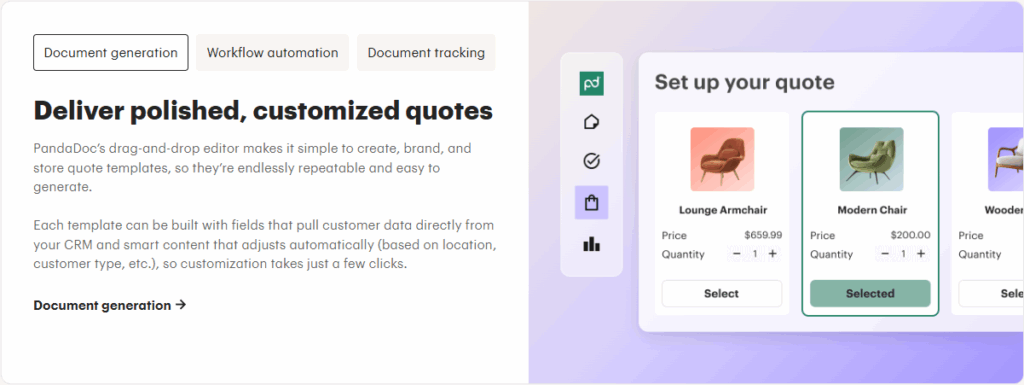
- Create proposals using standardized templates
- Route documents for internal approval before sending
- Send documents for review and signature without switching tools
This reduces handoffs and keeps the deal moving forward.
🔹Documents as a Core Part of the Sales Cycle 📈
In most sales workflows, documents appear at multiple stages:
- Early-stage proposals and quotes
- Mid-stage revisions and approvals
- Final-stage contracts and signatures
When these steps are handled with disconnected tools, friction builds at every transition.
🔹Clear Ownership at Every Step 👥
One common issue in sales workflows is unclear responsibility. PandaDoc helps clarify:
- Who created the document
- Who needs to approve it
- Who is expected to sign it
This clarity reduces delays caused by miscommunication or assumptions.
🔹Fewer Tools, Less Context Switching 🧠
Instead of juggling multiple platforms for documents, approvals, and signatures, sales teams work within a single system. This:
- Saves time
- Reduces errors
- Keeps deal-related information centralized
Sales reps spend less time managing tools and more time engaging with prospects.
🔹Why This Fit Matters 💡
When document workflows align with the sales process, deals move faster and with fewer surprises. PandaDoc fits into sales operations by supporting each document-related step without forcing teams to change how they sell.
3️⃣ Deal Visibility & Document Tracking for Sales Reps
Blind follow-ups? Total time-waster. 😩 Sales document tracking in PandaDoc arms reps with buyer intel like a superpower see everything, sell smarter. Here’s the full breakdown. 👀
Instant alerts: Know when proposals land.
Get push notifications, emails, or Slack pings: “🚨 Prospect opened your quote 3 mins ago—viewed on iPhone from NYC.” Timestamped logs track every open, forward, or download. No more “Did they see it?” radio silence.
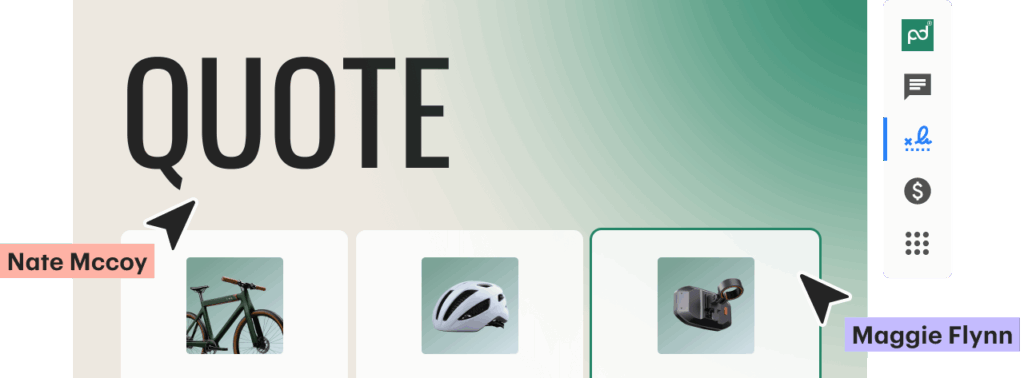
Engagement signals that reveal intent.
- 📊 Page-level analytics: Time spent per section (e.g., “ROI page: 4 mins” vs. “Terms: 10 secs”).
- 🔥 Heatmaps & scrolls: Visual trails show what grabs attention—pricing tables lit up? They’re hooked!
- 📱 Device insights: Mobile vs. desktop views, even geolocation for timely calls (“Saw you’re in the office—chat?”).
Follow-ups powered by data, not guesses.
Set auto-reminders: “No views in 48 hrs? Nudge now.” Prioritize: Leads with 5+ views close 3x faster (PandaDoc benchmarks). Integrate with HubSpot or Salesforce for seamless pipeline updates.
Pro tip: Reps using this see 50% shorter sales cycles. PandaDoc for sales teams flips uncertainty into momentum track, engage, close. 🎯
4️⃣ Approval Workflows for Sales Managers
Drowning in “Pls approve ASAP” emails? Legal ghosts you for days? 😵💫 Sales approval workflows in PandaDoc create order from anarchy custom, trackable paths that enforce compliance without killing momentum. Deep dive ahead.
🔧 Step-by-step workflow builder.
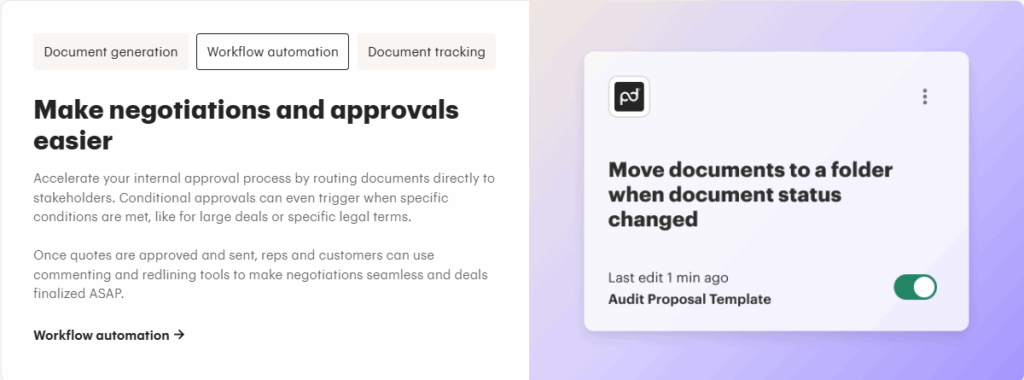
- Design visually: Drag paths—e.g., Rep submits → Manager (you) reviews → Parallel Legal + Finance.
- Smart rules: “Enterprise deal? Add Compliance. Under $10K? Auto-yes. ✅”
- Role or user assignment: “Route to APAC Legal” or “Current deal owner.” Unlimited steps.
🗣️ Zero-confusion collaboration.
- In-doc @mentions notify instantly (email/Slack).
- Live redlining: Finance fixes pricing tables; legal stamps “Approved” with reason.
- Version lock: No rogue edits post-approval. Example: “Q2 promo approved by CFO at 3 PM IST.”
⚖️ Ironclad compliance baked in.
Full audit trails (who/when/what). Fields for mandatory checks: “GDPR consent? Y/N.” Global certs: ESIGN/UETA/eIDAS/GDPR. Revoke access if risks pop.
📱 Mobile + integrations for real life.
Approve via app (iOS/Android). Syncs with Salesforce/HubSpot deal stages update auto. Notifications: “Urgent: $50K quote pending 2 hrs.”
📈 Reporting that proves ROI.
Dashboards show: Avg. time-to-approve (target <24 hrs), bottlenecks (e.g., “Legal at 70%”), team rankings. PandaDoc users: 80% faster approvals, 40% fewer compliance issues.
Reps close quicker; you sleep better. PandaDoc for sales teams makes workflows your edge. ⚙️🚀 What’s your biggest approval headache?
When sales contracts move beyond simple quotes and require supply chain coordination, integrations become essential. For example, teams using PandaDoc alongside SCM platforms can automate approvals and contract syncing across departments. See how this works in our detailed breakdown of ShipChain SCM + PandaDoc Integration for Contract Automation
5️⃣ eSignatures That Speed Up Sales Closures ✍️⚡
The final stage of a deal is often where momentum is lost. Printing documents, scanning signatures, and coordinating multiple signers can turn a simple agreement into a slow, frustrating process. For sales teams, these delays can mean missed timelines and stalled decisions.
1. Why Traditional Signing Slows Deals 🐢
Manual signing processes usually involve:
- Sending documents back and forth over email
- Waiting for signatures from multiple people
- Unclear status on who has signed and who hasn’t
Each extra step increases the chance of delays or drop-offs.
2. How eSignatures Simplify Closing 🔐
With PandaDoc, sales teams can add signature fields directly into documents and send them for signing in a few clicks. This allows:
- Recipients to sign from any device
- Multiple signers to complete documents in a defined order
- Sales reps to track signing progress in real time
Everything happens within the same workflow.

3. Faster Turnaround Without Extra Follow-Ups ⏱️
Because signing is streamlined:
- Deals move forward without unnecessary pauses
- Sales reps spend less time reminding people to sign
- Documents are completed more quickly and predictably
This helps maintain momentum at the most critical stage of the sales cycle.
4. Clear Records and Traceability 📜
Each signed document includes:
- Time-stamped signing records
- A history of all actions taken
- A clear trail showing when and how signatures were completed
This reduces confusion and makes it easy to reference completed agreements later.
5. Why This Use Case Matters 💡
Speed matters when closing deals. By removing friction from the signing process, sales teams reduce delays, improve the buyer experience, and bring deals to completion with greater confidence.

6️⃣ Collaboration Between Sales, Finance & Legal
Gurugram sales rep emails Mumbai finance: “Latest quote attached v17.” Reply: “Wrong discounts!” Sound familiar? 🤯 PandaDoc’s document workflow for sales teams ends this with live, permissioned collab one doc rules all.
🏗️ Setup: Shared workspaces & invites.
Create team folders: “Q1 Deals.” Invite via email/SSO: Sales (edit), Finance (numbers only), Legal (clauses). Integrates with Google Workspace/Microsoft 365 for seamless starts.
✏️ Real-time editing magic.
- Sales: Drag-drop content blocks, embed CRM data (e.g., Apollo.io leads).
- Finance: Dynamic tables auto-calc totals; lock cells to prevent tweaks. Example: “Base ₹5L + 20% services = ₹6L.”
- Legal: Redline tool highlights changes; insert e-stamped terms.
🛡️ Permissions: Role-perfect control.
| Role | Can Do | Can’t Do |
|---|---|---|
| Sales | Audit every action who edited what, when. | Change prices |
| Finance | Approve tables | Delete sections |
| Legal | Add/require sign-off | Send without approval |
| Audit every action—who edited what, when. |
🗨️ Comms hub inside the doc.
- @Mentions: “@Finance_Gurugram: Check Q2 margins?” Instant Slack/email ping.
- Threaded comments + tasks: “Resolve by EOD” with deadlines.
- @channel for full team: “All: Feedback on this enterprise MSA?”
📜 Advanced: Versions, templates, exports.
Full history: Compare “v1 (Sales draft)” vs. “v5 (Legal OK).” Branded templates pre-load standards. Export signed PDFs to Dropbox/CRM.
📊 Impact metrics: 65% less email (PandaDoc), 50% faster alignment. From proposal to signed in days, not weeks. PandaDoc sales workflow = cross-team superpowers. 👥🚀💼 What’s your collab nightmare?

If your sales team is ready to implement PandaDoc, checking for an active PandaDoc discount or coupon offer can help reduce onboarding costs.
7️⃣ Common Sales Use Cases by Team Type
PandaDoc flexes for every sales squad. PandaDoc sales use cases shine differently by scale pick yours. 📏
Small sales teams (1-10 reps):
Solo hustlers or startups love quick wins. 🏪
- One-click proposals from templates.
- Personal tracking: “Opened? Nudge now.”
- Self-signing for SMB deals under ₹10L.
Frees time for calls, not admin ideal for bootstraps.
Growing sales teams (10-50 reps):
Scaling pains? Automate here. 📈
- Team templates + branding consistency.
- Manager approvals on mobile.
- Engagement analytics for pipeline prioritization.
Cuts ramp-up time 40%; handles volume spikes.
Enterprise sales teams (50+ reps):
Complex, global deals demand control. 🏢
- Multi-stage workflows (Legal + C-suite).
- Custom pricing/CPQ integrations.
- Enterprise reporting + SSO security.
Manages 1000s of docs; ensures compliance at scale.
Every team sells smarter with less friction. Which fits you? 🔍
8️⃣ When PandaDoc Makes the Biggest Impact for Sales Teams
PandaDoc transforms average teams into closers but shines brightest in these high-pain scenarios. PandaDoc for sales teams = targeted firepower. 🚀 Let’s unpack.
🏭 High-volume proposal environments (50-500 docs/month).
Manual madness?
- How it helps: Library of 100+ templates + bulk personalization (CRM pull). Send 100 variants in 30 mins.
- Win: 70% faster creation (PandaDoc); reps handle 2x volume without burnout. Example: Agency quoting 20 RFPs/week.
⚙️ Complex pricing or approvals (multi-line items, stakeholders).
Spreadsheets + email loops?
- How it helps: Live pricing tables (discounts auto-calc), conditional workflows (“$50K+? Route to CRO”). In-doc Legal stamps.
- Win: 90% fewer errors, 80% quicker sign-off. Example: SaaS with upsells—buyer self-configures, you approve.

🌍 Remote or distributed sales teams (multi-timezone, hybrid).
Zoom fatigue + lost files?
- How it helps: Mobile-first: Track views globally, eSign from phones, Slack alerts (“Opened in Tokyo!”). Unified dashboard.
- Win: 50% shorter cycles; no printing/shipping. Example: India HQ + US reps—real-time collab across IST/PST.
Extra edge: CRM integrations (Apollo/Salesforce) auto-populate; analytics predict closes. If docs drag >20% of your time, PandaDoc sales workflow unlocks velocity. 💥 Which scenario screams “you”?
Conclusion 🧠📄
For sales teams, documents are not just paperwork they are a critical part of how deals move forward. From proposals and approvals to signatures and collaboration, every delay or mistake in the document process can slow momentum and affect outcomes.
What becomes clear across these use cases is that manual document handling doesn’t scale well. As deal volume grows and more teams get involved, the lack of structure leads to errors, delays, and poor visibility.
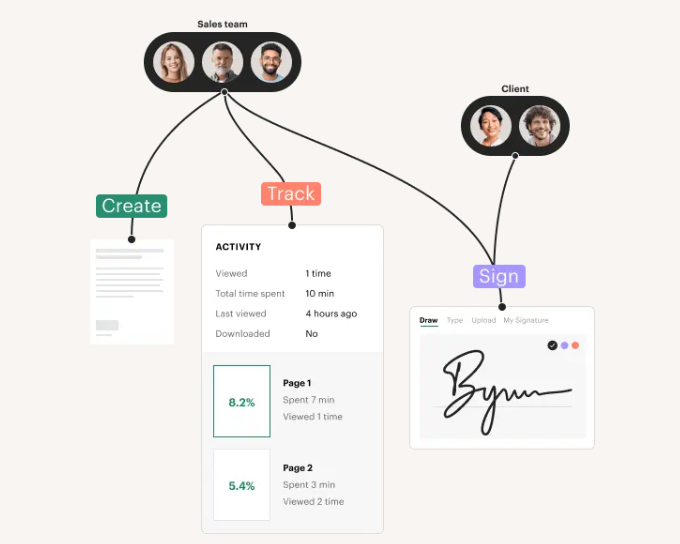
PandaDoc fits into sales workflows by bringing documents, approvals, signing, and tracking into one connected process.
The real impact comes from alignment. When sales, finance, and legal teams work from the same document workflow, deals move forward with fewer interruptions.
Sales reps spend less time managing files and follow-ups, and more time focusing on conversations that drive results.
Internal links to weave in:
Learn what PandaDoc is and how it works.
Explore more business use cases of PandaDoc.
FAQs ❓📌
1. How do sales teams use PandaDoc in daily work?
Sales teams use PandaDoc to create proposals, manage approvals, send documents for signing, and track engagement all within one workflow.
2. Is PandaDoc suitable for small sales teams?
Yes. Small teams often use it to save time on proposal creation and avoid manual document handling.
3. Can PandaDoc support complex sales deals?
It supports structured pricing, multi-step approvals, and multiple signers, which helps with more complex deals.
4. Does PandaDoc help with sales approvals?
Yes. Documents can be routed through predefined approval workflows before being sent externally.
5. Can sales reps see when a proposal is viewed or signed?
Yes. PandaDoc provides visibility into document activity, including views and signing status.

Hi, I’m Nelson 👋 a content writer and reviewer with 6+ years of experience writing blogs, coupon guides, and detailed website reviews. I have a strong background in continuous learning and research, which helps me analyze platforms, tools, and websites in a structured and practical way 📚.
My content is based on real research, hands-on analysis, and accuracy, with a clear focus on simplicity, transparency, and user-first value. I aim to break down complex information into content that’s easy to understand and genuinely helpful for readers ✅.